



What is Safe Mode in Antigravity?
Safe mode in Antigravity is a set of settings that determines how far an agent can run terminal commands, edit files, read the web, and call MCP tools before asking you. According to the official documentation (read 03/11/2026), the settings consist of three layers: preset levels like Request Review, Default, Auto, Turbo in the Antigravity App; Allow, Ask, Deny rule lists using action(target) syntax; and a sandboxed terminal that isolates commands at the operating system level. Antigravity CLI has additional execution modes default, accept-edits, auto, plan and two flags --sandbox, --dangerously-skip-permissions. This post makes no promise that any mode is "absolutely safe": sandbox and rules only reduce risk, and Auto mode is still in Preview form. Product introduction and reported issues are in the post What is Antigravity?.
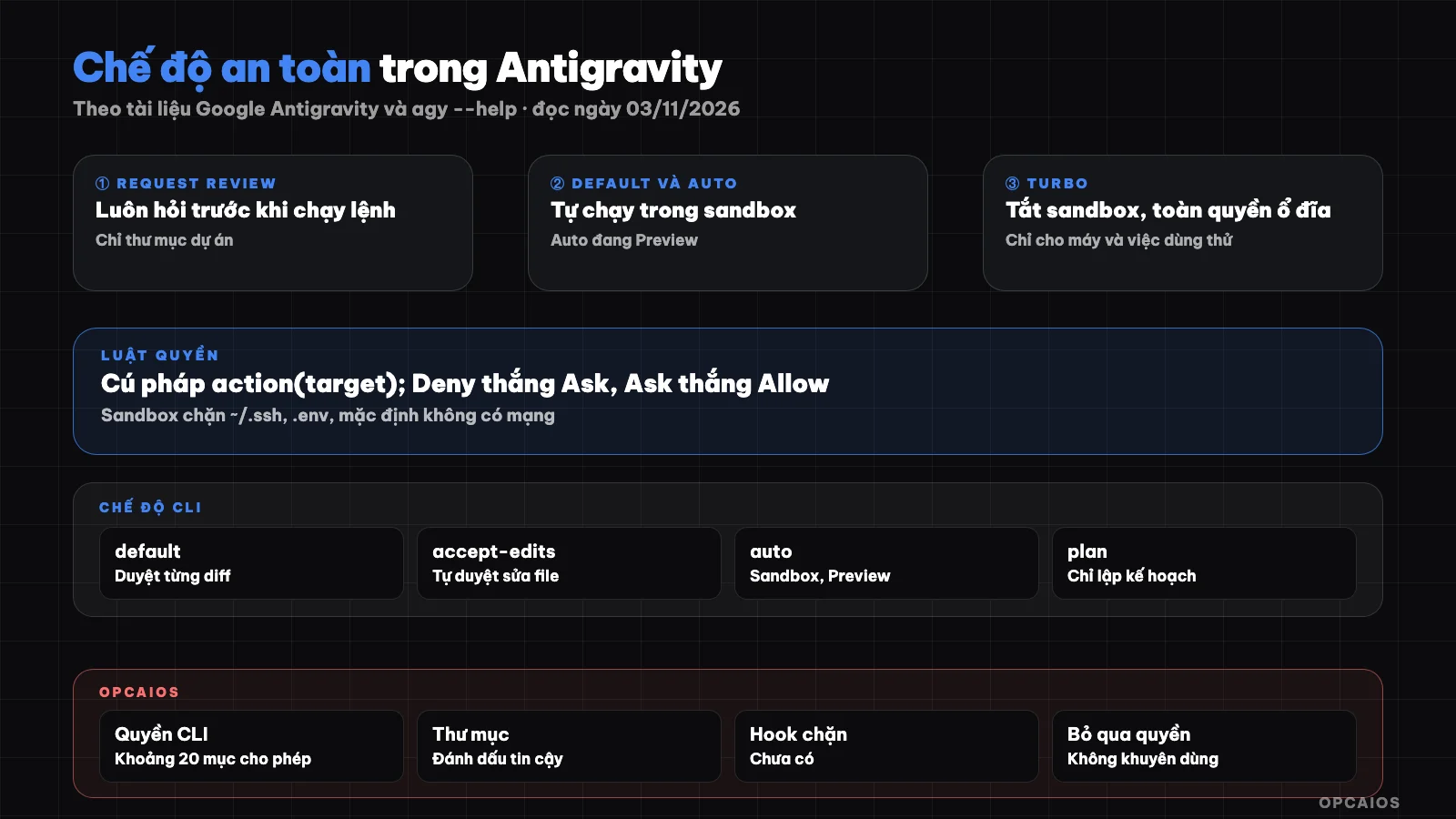
Three layers of safety: preset, Allow/Ask/Deny rules, sandboxed terminal. Diagram: OPCAIOS.
How do the four permissions presets in Antigravity App differ?
Permissions presets are preset levels that determine how the agent runs commands, accesses files, and calls MCP; according to the /docs/permissions and /docs/agent-settings pages (read 03/11/2026), Antigravity App has four presets:
| Preset | Sandbox | Terminal commands | File access | MCP and web |
|---|---|---|---|---|
| Request Review | Off | Always ask | Project directory only | Ask |
| Default | On | Run freely in sandbox, ask when outside | Project and temp directories | Ask |
| Auto (Preview) | On | Run freely in sandbox, auto-evaluated outside sandbox | Project and temp directories | Ask |
| Turbo | Off | Run freely, never ask | Entire disk | Allow |
Auto (Preview) has been available since version 2.23.0, not yet for business and enterprise accounts. Change preset at Settings > General > Global Permissions, override per project at Settings > Projects, or through the permissions picker in the message box. Business and enterprise accounts use the old settings (Require Review, Proceed in Sandbox, Always Proceed; Security Preset has Turbo mode), and none of the old presets automatically enable sandbox.
How are command allow and block lists written?
Rule lists are a layer that sits above presets and always takes priority over presets. According to /docs/permissions (read 03/11/2026), each sensitive action is represented as action(target) and placed into three lists: Deny blocks immediately, Ask pauses to ask, Allow runs without asking. When rules conflict, the order is Deny over Ask over Allow; for example, putting command(*) in Ask and command(git) in Allow means all commands are still asked. Supported action types are:
read_file,write_file: by path; allowing write carries over read, blocking read carries over write.read_url: by domain name; also opens the network list for sandbox.execute_url: click, type on a web page.command: matches word prefix, orregex:.mcp: a single tool or entire MCP server.
Some shell structures like $(...) can hide commands after a harmless prefix so must match exactly. Example from the documentation: with command(git) in Allow, both git status && git log runs freely, but git log $(whoami) is still asked. Example of a careful CLI configuration, written according to documentation syntax:
{
  "permissions": {
    "allow": ["command(git status)", "command(regex:npm run (build|lint|test))"],
    "ask": ["command(git push)", "mcp(*)"],
    "deny": ["command(sudo)", "command(rm -rf)", "write_file(.git/)"]
  }
}
In the CLI, /permissions opens a rule manager with scope Project, Shared, Global and three tabs allowlist, denylist, asklist. When asked for permissions, you can allow once, throughout the conversation, or save it to settings.json; the last choice bloats the list and few go back to review it.
What are allowlist and denylist in Antigravity IDE?
The /docs/ide/allowlist-denylist page (read 03/11/2026) discusses browser URLs, not commands. Denylist is maintained by Google on the server side, if the server does not respond then it defaults to blocking. Allowlist is a local file, initially only localhost, added via Always allow button. Denylist always wins.
What Does Sandbox Terminal Block and What Does It Not Block?
Sandbox terminal is a shell command isolation layer for agents using built-in OS mechanisms, without needing virtual machines or Docker. According to the /docs/sandbox page (read 03/11/2026), macOS uses sandbox-exec with Seatbelt profiles, Linux uses kernel namespaces, Windows uses AppContainer and requires Windows 11 24H2 with August 2026 updates or later. In the sandbox, commands are written to the project directory, temp directory, build cache; sensitive files like ~/.ssh and .env are blocked, anything not mounted becomes invisible. Network is cut by default; only whitelisted domains through read_url can be accessed. Sandbox cannot block three things: commands you or rules allow to run outside the sandbox, since they then run on the machine with full permissions; destructive operations right inside the project directory, since the project is open for writing; and everything when you select Turbo, since Turbo turns off the sandbox.
From CLI 1.4.4, machines that don't support sandbox have --sandbox with no effect and auto mode does not appear.
How Are the Different Antigravity CLI Modes Different?
The execution mode of Antigravity CLI determines how far the agent stops to ask before editing files or running commands. According to agy --help version 1.4.12 and the /docs/cli/modes page (read 03/11/2026), the --mode flag accepts three values accept-edits, auto, plan; leaving it empty is the default mode:
| Mode | File Edits | Terminal Commands | Suited For |
|---|---|---|---|
| default | Show diff, wait for approval | Ask | Sensitive code, careful refactoring |
| accept-edits | Auto approve in project | Still ask by policy | Fast iteration on trusted code |
| auto (Preview) | Auto approve in project | Run in sandbox, outside sandbox is evaluated | Long tasks, build commands, repeated tests |
| plan | Read-only, plan first | No edits before you approve | Unfamiliar architecture, many file changes |
Press Shift + Tab to switch modes during a session; lock it with agentMode in settings.json or /config. Auto mode is available from version 1.3.5 on macOS, Linux and 1.4.4 on Windows, requires sandbox, and not yet available for business, enterprise accounts. When accept-edits is on, child agents in the session also inherit this setting.
Below the mode is the toolPermission key with four values: request-review (default), proceed-in-sandbox, strict (ask before any non-read operation, overrides auto) and always-proceed (run tools without asking, overrides auto). The allowNonWorkspaceAccess key defaults to off, keeping the agent within the project directory.
agy --mode=plan
agy --mode=accept-edits
agy --sandbox
How Dangerous Is the --dangerously-skip-permissions Flag?
The --dangerously-skip-permissions flag turns on the always-proceed level: according to agy --help (version 1.4.12), the flag auto-approves all tool permission requests without asking. The /docs/cli/headless page (read 03/11/2026) warns that the flag approves both file writes and command runs, and recommends using the permissions.allow rule with scope unless you completely trust the prompt and environment. The /docs/settings page adds an exception: always-proceed still respects Ask and Deny rules. This means the Deny list is the final barrier when this flag is on.
In non-interactive mode (agy -p), tools requiring approval are soft-rejected: the run still continues, exit code 0, message written to stderr; so pre-grant only the necessary commands instead of turning on the flag. Compare with other tools: approval mode and sandbox of Codex and plan mode and permission mode in Claude Code.
Which Mode Should I Choose for Each Type of Task?
Choose the safe mode based on the worst consequence if the agent makes a mistake, not based on convenience level. Our suggestions, not official Google recommendations:
- Read unfamiliar code, downloaded repos, client projects: use plan or Request Review, don't open network, don't allow access outside the project.
- Write features in a repo with clean Git: Default in App or accept-edits in CLI, with Allow rules for build, test commands.
- Repeated long tasks like fixing many tests: Auto (Preview) if your account and machine support it, with Deny for
sudo, recursive delete,git push. - Non-interactive tasks run on schedule: grant minimum Allow, don't use
--dangerously-skip-permissionson machines with real data. - Turbo: only in virtual machines or test machines that can be wiped clean, with backups.
Add these habits: commit before big work, Deny for .git/, review the Allow list each month. See more in security when using AI to write code.
OPCAIOS's Experience
OPCAIOS uses Antigravity as the orchestration agent on the primary Mac machine, along with Claude Code and Codex. Checked on 03/11/2026, at the conceptual level:
- The CLI has an allowlist of approximately 20 items and several marked-trusted working directories. We do not disclose the list contents.
- There are hooks at points before and after the agent and before and after tools, but only for reporting session status to a terminal management tool. We don't yet have command-blocking hooks, so the current blocking layer relies on rules and modes.
- An operational rule is just as important as any flag: website code can only be edited and deployed from a single machine to avoid drift. We once encountered more than 1,500 files flagged as different just because of line-ending style when deploying from a Windows machine. No permission mode can catch this kind of error; only process can.
We haven't measured the rate of blocked commands or time saved. To run multiple agents in parallel, see multiple AI sessions editing one project.
Frequently Asked Questions
Is Turbo mode still in Antigravity?
Yes, according to documentation read on 03/11/2026: Turbo is one of four permission presets in Antigravity App, described as running all commands without restriction, turning off the sandbox, full disk read-write access; business and enterprise accounts have Turbo mode in the legacy settings. Since Turbo bypasses the sandbox, use it only in tested environments with backups, never on machines holding customer data.
How does Auto differ from Turbo?
Auto (Preview) still keeps the sandbox on: commands running in the sandbox need no permission, while commands that need to run outside the sandbox are auto-assessed by the system—safe and reversible commands run, risky commands still prompt. Turbo turns off the sandbox and doesn't ask anything. Auto has been in the App since 2.23.0, in the CLI since 1.3.5 on macOS and Linux and 1.4.4 on Windows, and isn't yet available for business and enterprise accounts. The "auto-assessment" is Google's mechanism; we haven't verified its accuracy.
Does an Allow rule beat a Deny rule?
No. The priority order is always Deny over Ask over Allow, and these rules sit above any preset or mode. For example, if command(*) is in Ask, all commands still get prompted even if command(git) is in Allow. Even at the always-proceed level triggered by the --dangerously-skip-permissions flag, the settings documentation says Ask and Deny rules are still respected. So put absolutely forbidden commands in Deny; don't just rely on not allowing them.
Does the sandbox require Docker?
No. The /docs/sandbox documentation says the sandbox is built on OS-native mechanisms: sandbox-exec with Seatbelt profiles on macOS, kernel namespaces on Linux, AppContainer on Windows 11 24H2 with August 2026 updates or later, so no virtual machine and no startup overhead. On the CLI, enable with --sandbox, the enableTerminalSandbox key, or /config. Commands that need Docker usually won't run in the sandbox; the documentation suggests permitting such commands separately with command(...) rules.
What mode should someone with no coding knowledge start with?
Start with the CLI's default mode or the Default preset in the App, read each permission request before clicking allow, and use plan mode for bigger tasks to see the plan before the agent edits files. Don't select "always allow" when you don't understand the command, don't turn on Turbo on machines with real data. Detailed safe process is in the post programming agent for people with no coding knowledge; for hands-on guidance, see OPCAIOS's AI application training course.
Source: Google Antigravity documentation at antigravity.google/docs: /permissions, /sandbox, /ide/allowlist-denylist, /cli/modes, /cli/commands/permissions, /agent-settings, /settings, /cli/headless (read 03/11/2026); flags and modes cross-checked with agy --help version 1.4.12 same date. Not verified: accuracy of the auto-assessment mechanism in Auto mode, behavior on business and enterprise accounts; mode selection suggestions are our views, not Google's recommendation. Experience is OPCAIOS's.
Translated from Vietnamese with AI. Read the original.
Want to apply this in your business?
Book a free 30-minute call (Vietnam time, in English or Vietnamese).