


Choosing a Model in Antigravity
Choosing a model in Antigravity means deciding which reasoning model (Gemini, Claude, or GPT-OSS) and which thinking level (low, medium, high, sometimes xhigh or max) will run the agent for each conversation, based on the Google AI plan you're using and your remaining quota. This post does not rank which model is "best": Google does not publish such rankings in their documentation, and OPCAIOS has not measured quality or speed between models on the same task. Model names, thinking levels, commands, and flags are taken from the documentation at antigravity.google and from agy --help, agy models of CLI version 1.4.12, read on 03/11/2026. The model list changes quickly, so treat this post as a way to read and how to switch. The general introduction to the application, IDE, and CLI is in the post What is Antigravity.
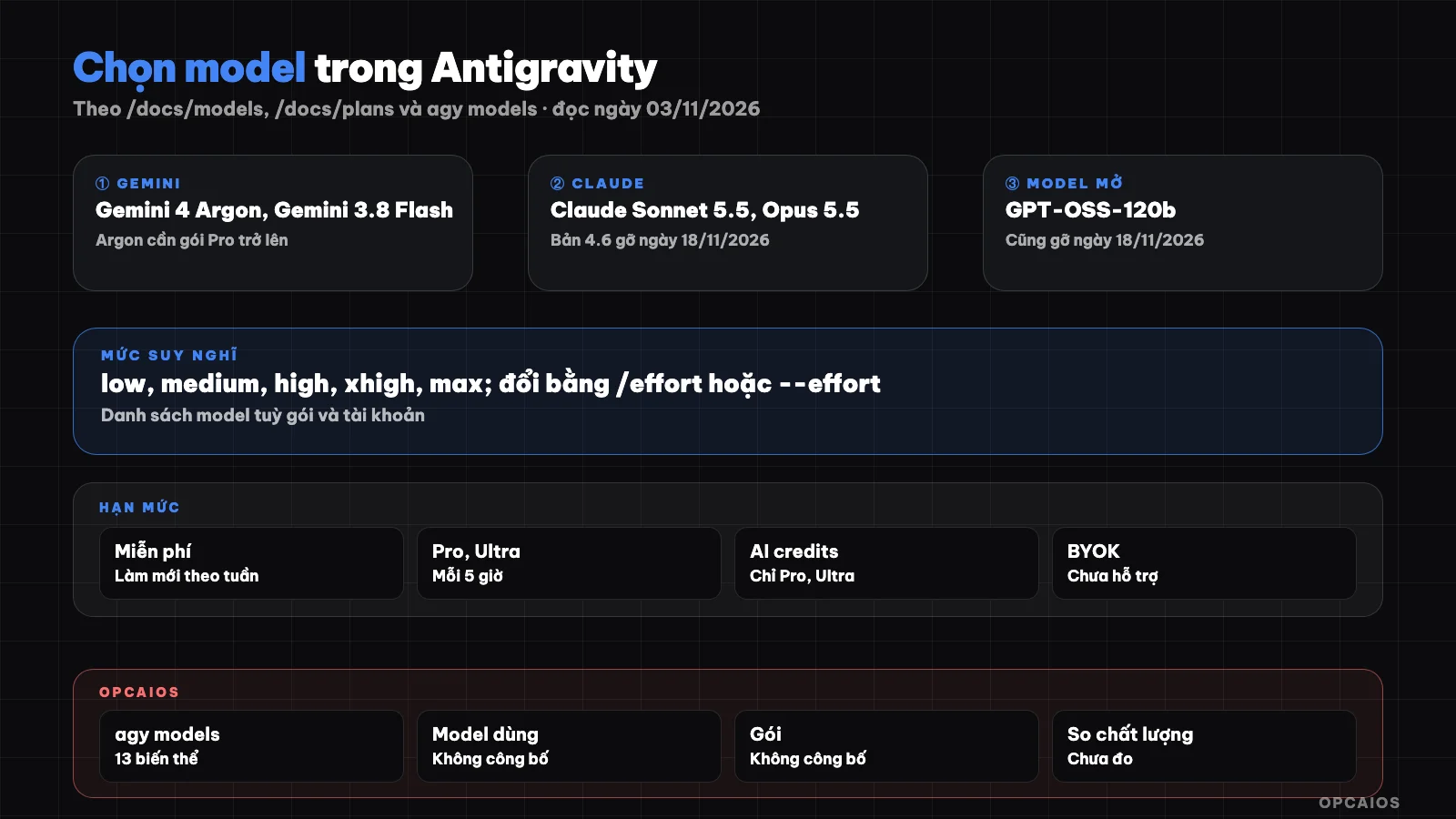
Three dials when choosing a model: model, thinking level, and quota. Diagram: OPCAIOS.
What models does Antigravity have according to current documentation?
Antigravity has three main families of reasoning models according to the /docs/models page (read on 03/11/2026): Gemini from Google DeepMind, Claude from Anthropic, and GPT-OSS 120B, with different usage rights by plan. This page lists Gemini 4 Argon, Gemini 3.8 Flash, Gemini 3.7 Flash, Gemini 3.6 Flash, Gemini 3.1 Pro, Claude Sonnet 5.5 and Claude Opus 5.5 (Thinking version), Claude Sonnet 4.6 and Claude Opus 4.6 (Thinking version), and GPT-OSS-120b. The table below summarizes usage rights by plan, restated from the documentation:
| Model | Free and Google AI Plus | Google AI Pro | Google AI Ultra | Enterprise |
|---|---|---|---|---|
| Gemini 4 Argon | No | Yes (paid Pro plan) | Yes | Yes |
| Gemini 3.8 Flash | Yes | Yes | Yes | Yes |
| Gemini 3.7 Flash, 3.6 Flash, 3.1 Pro | No | No | No | Yes |
| Claude Sonnet 5.5, Opus 5.5 | No | Yes (not applicable to trial version) | Yes | Yes |
| Claude Sonnet 4.6, Opus 4.6 | Yes | Yes | No | No |
| GPT-OSS-120b | Yes | Yes | Yes | No |
Most important note: Claude Sonnet 4.6, Claude Opus 4.6, and GPT-OSS-120b will be removed on 18/11/2026. Antigravity still uses Nano Banana 2 for image generation tools, and this part cannot be chosen.
What does the agy models command show on a specific account?
The agy models command tells you which models your own account can use, because the table in the documentation is shared across all plans. According to agy --help version 1.4.12, the models subcommand lists available models, and the --model flag accepts names from that list.
agy --version
agy models
On OPCAIOS's account on 03/11/2026, agy models returns 13 lines, each with a model code and a display name:
- Gemini 4 Argon: Low, Medium, High.
- Gemini 3.8 Flash: Low, Medium, High.
- Claude Opus 5.5: Low, Medium, High.
- Claude Sonnet 5.5: Low, Medium, High.
- GPT-OSS 120B: Medium only.
This is the list for that account at the time of check, and may differ from your account. The CLI separates each thinking level into its own variant (code with suffix -low, -medium, -high), and no model here has xhigh or max variants.
What is thinking level (effort) in Antigravity?
Thinking level (effort) in Antigravity is the reasoning budget that a model spends on each response: low level answers quickly and lightly, high level thinks deeper and slower. The /docs/models page calls this thinking level and lists three levels Low, Medium, High in the app; the /docs/cli/commands/effort page (read on 03/11/2026) lists 5 levels that the CLI recognizes, from lightest to heaviest:
- low: quick response, good for quick lookups, syntax checking, simple fixes.
- medium: balance of speed and quality for daily technical work.
- high: deep reasoning for complex architecture, hard bugs, refactoring many files.
- xhigh: only available with models that announce an xhigh variant.
- max: highest budget, only available with models that announce a max variant.
Most tunable models support low, medium, high; models with fixed thinking levels then the CLI reports that they cannot be adjusted. In the app's picker, Gemini 3.1 Pro only has Low and High. The descriptions "good for this task" are from Google, not measurements from OPCAIOS.
How to change model and thinking level in the app and CLI?
Changing model in Antigravity has two paths: the model selector below the input box in the app (and IDE), or commands and flags in the CLI agy. The choice in the app persists across messages in the same conversation.
In the Antigravity app
Open the selector below the input box, choose a model then choose the thinking level; the selector also shows your remaining quota. Changing model while an agent is running will keep using the old model for that run (details in the FAQ section).
In the agy CLI
Pages /docs/cli/reference and /docs/settings (read 03/11/2026) describe these ways:
/model: choose your preferred model, save it for later sessions (themodelkey in settings.json, saved by display name)./model <model> <prompt>: run a single command on a different model without changing the default.--model: choose model for the current session, don't save it./effort: open the thinking level slider;/effort low(or medium, high) changes it right away and saves as default.--effort: set thinking level for a single run, don't change the default.
agy --model="Gemini 3.8 Flash"
agy --effort low
agy -p "/effort" --output-format json
agy -p "Summarize the changes in the last commit" --effort low
In -p mode, /effort is view-only, takes no parameters. Detailed CLI operations are in the post Antigravity CLI agy.
How do quota and AI credits work in Antigravity?
Quota in Antigravity is the amount of agent work allowed per plan, while AI credits are extra purchases to use when quota runs out, from page /docs/plans (read 03/11/2026). The free plan has quota that refreshes weekly; Google AI Pro refreshes every 5 hours until hitting the weekly limit; Google AI Ultra has the highest quota, also refreshing every 5 hours. Google says quota correlates with agent workload, complex work costs more, and quota can be adjusted. The model selector shows two separate quota groups: the Gemini group and the Claude plus GPT group, each with a weekly limit and a 5-hour limit.
Things to know when quota runs out:
- Only Pro and Ultra plans can use purchased AI credits, priced at Gemini Enterprise standard consumption rates.
- AI Credit Overages setting has two values: Never (wait for refresh) and Always (use credits automatically).
- In CLI, the
useG1Creditskey defaults to false; turn it on with/configor/settings. /creditsopens the credits balance sheet;/usage(alias/quota) opens the quota sheet by model.- Using a separate API key (BYOK) to increase quota is not yet supported.
On pricing: page /pricing on 03/11/2026 lists the personal plan as $0/month, with Google AI Pro and Ultra available but no price shown on the page, and the Gemini Enterprise plan from $30/person/month or pay-as-you-go. The total cost calculation for AI tools is in the post AI tool cost replacing 3 staff.
When should you change model in Antigravity?
Change model in Antigravity when you have a specific reason: the plan doesn't have that model, one group's quota is depleted, a model is being retired, or the work doesn't need deep thinking. The five cases below are based on the docs, not quality benchmarks:
- Model not in your plan: the free plan doesn't have Claude 5.5 or Gemini 4 Argon per /docs/models; check
agy modelson your own account. - One quota group is depleted: the Gemini group and the Claude plus GPT group are separate, switching to the other group keeps you going without spending credits.
- Model being retired: Claude 4.6 and GPT-OSS-120b retire on 18/11/2026, so migrate workflows ahead of time.
- Light work like lookup, minor edits: Google describes low level as suited for this kind of work; exact savings are unverified.
- Hard work, repeated errors: try raising to high before switching model families.
A hypothetical, not a real person: someone doing OPC uses Gemini 3.8 Flash at medium level for daily work, runs /model <model> <prompt> to a Claude model for a second opinion, then checks /usage at day's end. New to the model concept, read the post What is LLM.
OPCAIOS Experience
OPCAIOS is the website opcaios.org run by a single person using AI agents. These are facts, verified on 03/11/2026:
- The main Mac has Antigravity application version 2.28.x, Antigravity IDE version 2.5.x and CLI
agyversion 1.4.12, running in parallel with Claude Code and Codex. How these three tools divide their roles is in the post Antigravity, Claude Code and Codex in one system. agy modelson our account lists exactly 13 variants mentioned above; there are no xhigh or max variants.- We have not compared quality, speed or rate limit consumption between models on the same task, so we do not recommend a fixed model.
- We have not measured productivity and have no data on time saved when switching models or thinking levels.
Frequently Asked Questions
Which model is best in Antigravity?
Antigravity documentation does not rank models, and OPCAIOS has not measured this so there is no "best" answer. The documentation only describes thinking levels: low for speed, medium for everyday work, high for complex tasks. The practical approach is to start with the model in your plan at medium level, only switching when you have a specific reason like hitting a rate limit or getting repeated wrong results.
Why don't I see Claude Opus 5.5 in the dropdown?
According to the /docs/models table read on 03/11/2026, Claude Sonnet 5.5 and Claude Opus 5.5 are not in the free plan and Google AI Plus, and with Google AI Pro only apply to paid subscriptions, not trial versions. Gemini 4 Argon also requires the paid Pro plan. Run agy models to see the actual list for your account, since the list by account may differ from the general table.
If I switch models in the middle, does the agent switch right away?
Not immediately. According to /docs/models, if you switch models while the agent is running, the agent continues using the old model until it finishes the steps of the current turn or until you cancel. The next turn uses the new model, and that choice is kept as the default in the conversation. In the CLI, --model and --effort only apply to that session or run, while /model and /effort <level> are saved as defaults.
If I hit my rate limit, does Antigravity automatically charge me?
Not automatically unless you turn it on. According to /docs/plans, only Pro and Ultra plans can use purchased AI credits, and the AI Credit Overages setting determines whether to auto-use credits (Always) or wait for renewal (Never). In the CLI, useG1Credits defaults to false. Check your balance with /credits, your limit with /usage. This is documentation description, not financial advice.
Can I use my own API key to get more models or higher limits?
According to /docs/plans read on 03/11/2026, Antigravity does not yet support BYOK (bring your own key) to increase limits. Only the CLI has a modelProvider setting as "gemini" to send requests directly to Gemini API using your key, with customModelsConfig to add Gemini models to /model. To learn how to choose and manage AI tools with cost control, see OPCAIOS's AI application training course.
Source: Google Antigravity documentation at antigravity.google: /docs/models, /docs/plans, /docs/cli/commands/effort, /docs/cli/credits, /docs/cli/commands/credits, /docs/cli/commands/usage, /docs/cli/reference, /docs/settings, /docs/faq and /pricing page; agy --help and agy models from Antigravity CLI 1.4.12; all read on 03/11/2026. Not verified: quality and speed between models, actual rate limit consumption of each thinking level, pricing for Google AI Pro and Ultra plans; model list changes over time and by account. The experience is OPCAIOS's.
Translated from Vietnamese with AI. Read the original.
Want to apply this in your business?
Book a free 30-minute call (Vietnam time, in English or Vietnamese).