



Claude Code, Cursor, or Codex CLI are the three most popular AI programming agents today, and the right question is not "which one is strongest" but "which one fits how I work". Claude Code is Anthropic's agent running in terminal, IDE extensions, desktop application, and on the web; Cursor is Anysphere's code editor with an integrated agent, plus a command-line version and cloud agent; Codex CLI is OpenAI's open-source code agent running on your machine, bundled with IDE extensions, desktop application, and Codex Web. This post compares them by workflow style, not by benchmark: we don't measure or pull any performance scores. Prices in this post come from official pricing pages read on 03/11/2026, before tax, and may change. OPCAIOS's real experience is with Claude Code, Codex CLI, and Google Antigravity; we don't use Cursor daily, so everything about Cursor here is based on official documentation. The post contains: what each tool is, a pricing table, a comparison table, a list of when to pick which one, and how to use multiple tools together using AGENTS.md.
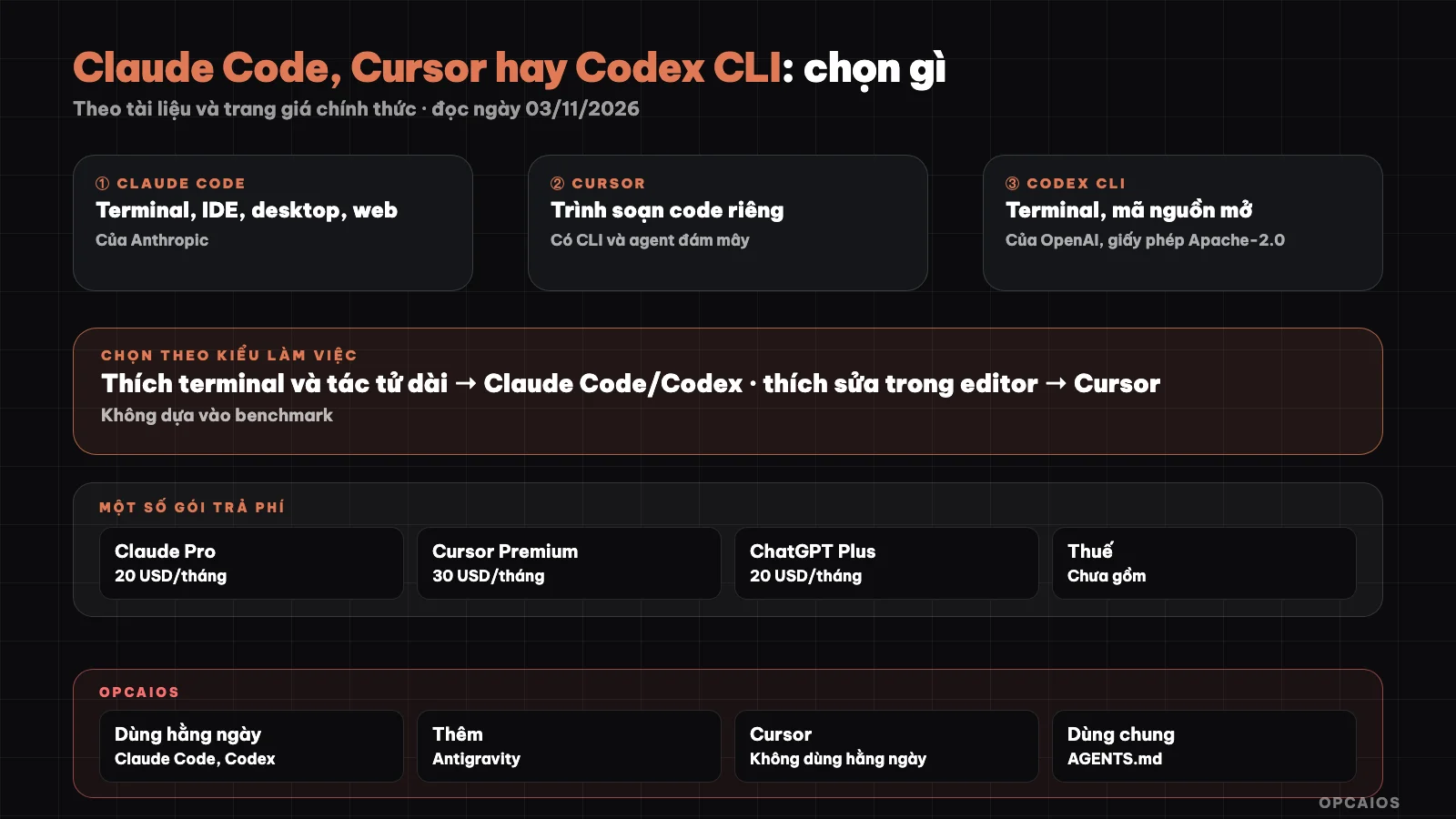
Three tools, three workflows, one shared guide file. Diagram: OPCAIOS.
What is Claude Code and where does it run?
Claude Code is Anthropic's programming tool in agent form: you describe a task in words, Claude Code reads your source code, edits multiple files, runs commands, and works with git. According to Claude Code's overview page at code.claude.com (read on 03/11/2026), Claude Code runs on four main surfaces: CLI in terminal, extensions for VS Code (can also be installed in Cursor) and JetBrains, desktop application, and web version at claude.ai/code (also available on mobile app). All share the same core, so CLAUDE.md, project settings, and MCP servers work the same everywhere. Most surfaces need either a paid Claude plan or an Anthropic Console account; the desktop app needs a paid plan. Strengths by workflow: suits people who like to assign tasks by voice, read the plan, then review the results; has permissions, skills, hooks, subagents, scheduled tasks, and non-interactive mode for automation. Detailed overview post: What is Claude Code.
What is Cursor and where does it run?
Cursor is an IDE with integrated AI agent, main footer copyright Anysphere, Inc. According to Cursor's rules page in the documentation (read on 03/11/2026), Cursor has three work places: editor, command-line version (CLI), and Cloud Agents running in the cloud; project rules work the same in all three. The cursor.com/pricing page on the same date shows packages being sold through X Subscription Corp and pooling usage limits between Cursor and Grok; ownership context is in the post What is Cursor. Strengths by workflow: suits people who want to both edit individual lines by hand and have an agent help at the same time in the same editor, seeing diffs right there. Note: OPCAIOS doesn't use Cursor daily, we haven't verified Cursor's actual experience, suggestion quality, or speed ourselves.
What is Codex CLI and where does it run?
Codex CLI is OpenAI's lightweight programming agent running on your computer, open source under the Apache-2.0 license. According to the README on github.com/openai/codex (read on 03/11/2026), Codex has a terminal version, extensions for VS Code, Cursor, and Windsurf, a desktop app (launch with codex app), and Codex Web is an agent running in the cloud at chatgpt.com/codex. Note: the current Codex documentation page (learn.chatgpt.com, read on 03/11/2026) calls the desktop version the ChatGPT desktop app for macOS, Windows, and Linux, where you choose ChatGPT or Codex mode, rather than describing it as a separate Codex app. The recommended login method is "Sign in with ChatGPT" using a ChatGPT plan; using an API key also works but needs extra setup. Install per the README:
curl -fsSL https://chatgpt.com/codex/install.sh | sh
codex
The README also lists how to install via npm (npm install -g @openai/codex) and Homebrew (brew install --cask codex). Strengths by workflow: suits people who already have a ChatGPT plan, like working in terminal, and want to read the source code of the tool itself.
What are the prices of the three tools today?
The prices of the three tools both come in two layers: monthly package fees and AI usage limits that come with them; no site specifies the limits in fixed tokens. The table below is read on 03/11/2026 (USD per month, excluding tax, subject to change):
| Tool | Main packages | Notes from pricing page |
|---|---|---|
| Claude Code (claude.com/pricing) | Pro 20 (17 when paid yearly), Max 100, Ultra 200; Team 25 or 125 per seat per month; Enterprise 20/seat paid yearly plus API fee | Free does not include Claude Code; limits by frame of 5 hours and per week; can pay by token via API |
| Cursor (cursor.com/pricing) | Free, Plus 8 (introductory price, Grok model only), Premium 30, Super 100, Ultra 200; Teams from 30/person; Enterprise by negotiation | Usage limits shared between Cursor and Grok, refreshed weekly; third-party models charged separately at listed API prices |
| Codex (Codex Pricing page) | Free 0, Go 8, Plus 20, Pro from 100 (100, 200 or 500); Business 20/person paid yearly or 25 per month; Enterprise and Edu contact us | Local and cloud messages share usage limits; using API key charged at API prices |
The Codex pricing page we read through developers.openai.com/codex/pricing, which redirects to learn.chatgpt.com/docs/pricing. This table is not financial advice. Details on how to reduce tokens for Claude Code are in the post Claude Code costs.
How do they compare by different work styles?
Comparing by work style means asking: where do you sit, how do you hand off work, and how do you review results. The table below summarizes from official documentation read on 03/11/2026, not performance measurements:
| Criterion | Claude Code | Cursor | Codex CLI |
|---|---|---|---|
| Main work location | Terminal, plus IDE, desktop, web | Editor, plus CLI and Cloud Agents | Terminal, plus IDE, ChatGPT desktop app (Codex mode), Codex Web |
| Most integrated interaction style | Hand off work by voice, read plan, review diff | Manual editing with agent in editor | Hand off work by voice in terminal |
| Project guide file | CLAUDE.md, reads AGENTS.md | .cursor/rules and AGENTS.md |
AGENTS.md |
| Tool source code | Documentation does not state | Documentation does not state | Open, Apache-2.0 |
| Model | Claude | Grok, third-party models charged separately | OpenAI models |
| Payment method | Claude package or API | Cursor package, third-party by API | ChatGPT package or API key |
No cell in the table says any tool is "better", because we have no fair measure for that.
Which tool should a solo worker choose?
A solo worker should choose based on current habits and the AI package already being paid for, not by rankings online. Suggestions by situation:
- You're not a programmer and want to hand off work and review results: Claude Code desktop or web is easy to start with, has a plan mode to read the plan before making edits. See the safe process in the post programming agent for people who can't code.
- You're used to editing code in an editor: Cursor fits because the agent sits right in the editor; or install Claude Code, Codex extensions into the editor you're using.
- You already pay for ChatGPT: try Codex CLI first, because you sign in with your ChatGPT package, don't need to buy a new package.
- You already pay for Claude Pro or higher: Claude Code is in your package.
- You need to automate running without a person sitting there (scheduled jobs, CI): both Claude Code and Codex have command-line form; read permissions documentation carefully before letting the agent run itself.
- Budget is very tight: use one tool, one package, track your usage limit for a month before buying more; read the post audit AI tool costs.
How to use multiple tools on one project with AGENTS.md?
AGENTS.md is a Markdown file placed at the project root, containing general instructions for all programming agents: project structure, test commands, things to avoid. All three tools can read this file according to documentation dated 03/11/2026:
- Codex reads AGENTS.md from the user directory (default
~/.codex) then from the project root down to the current directory, with closer files taking priority;AGENTS.override.mdreplaces AGENTS.md at the same level; default maximum total size is 32 KiB. - Cursor supports AGENTS.md at the project root and in subdirectories, no frontmatter needed.
- Claude Code reads AGENTS.md when the project has no CLAUDE.md; if CLAUDE.md exists, it reads only CLAUDE.md, unless CLAUDE.md imports AGENTS.md using the syntax
@AGENTS.md.
The concise way: write common rules once in AGENTS.md, have CLAUDE.md only import AGENTS.md plus a few Claude-specific things. See What is CLAUDE.md. When multiple agents edit the same repo, read more about multiple AI sessions editing one project.
OPCAIOS's experience
The opcaios.org website was built by one person using multiple agents. The main machine runs Claude Code version 2.1.x (CLI and desktop app), Codex CLI and Google Antigravity. We don't use Cursor daily and Cursor is not installed on the main machine, so the Cursor section in this post is based only on documentation.
- One shared instruction file for all agents like AGENTS.md, plus a separate Claude instruction file at the user level: reply in Vietnamese, read documentation in order at the start of each session, write a daily log at the end of the session, no junk files. The website repo has no separate CLAUDE.md at the root.
- Sync state through a shared status file and daily log in Obsidian, so one agent knows what the other agent just did.
- Each session commits only its own files, because multiple sessions share a git index. We once saw over 1,500 different files changed just because of Windows line endings when another agent deployed from a Windows machine.
We have not compared output quality or cost between tools on the same task, so we don't rank which tool is better.
Frequently Asked Questions
Which is best: Claude Code, Cursor, or Codex CLI?
There's no one-size-fits-all answer, and we don't have a fair metric to rank them. The three tools differ mainly in where you work and how you pay: Claude Code excels at voice-based task assignment across multiple surfaces, Cursor places the agent inside your editor, Codex CLI is OpenAI's open-source code agent that logs in via ChatGPT package. Try the same small task on whichever tool you already have a plan for, then decide based on how it feels to work with and your actual limits.
Do you need to pay for all three tools?
No. Solo workers typically need only one main tool. According to pricing pages as of 03/11/2026, Claude Code starts at Pro 20 USD/month, Codex has Free and Plus 20 USD/month, Cursor has Free and Plus 8 USD/month (introductory pricing, Grok model only); prices don't include tax and may change. Paying for multiple tools only makes sense if you clearly see each one doing something different.
Can you install Claude Code or Codex into Cursor?
Yes, according to the documentation. The Claude Code overview page has a link to install the Claude Code extension for Cursor, and the Codex README lists IDE extensions for VS Code, Cursor, and Windsurf. This way you can keep Cursor as your editor and call other agents right inside it. OPCAIOS hasn't tried this combination because we don't use Cursor daily, so we can't speak to what the real experience is like.
Can AGENTS.md replace CLAUDE.md?
It can in simple cases. According to Claude Code documentation as of 03/11/2026, if your project has only AGENTS.md, Claude Code reads AGENTS.md; if it has both, Claude Code reads only CLAUDE.md. The safe way when using multiple agents is to keep shared rules in AGENTS.md, then have CLAUDE.md import AGENTS.md with the line @AGENTS.md, adding only what's specific to Claude. That way you edit one place and every agent sees it.
What tool should someone who doesn't know how to code start with?
Start with a tool that has a graphical interface and a plan view before making changes, such as Claude Code's desktop app or web version, or Codex mode in the ChatGPT desktop app. Whichever tool you pick, work on a test project, read the plan before letting it make changes, don't put secrets in your prompt, and always have a backup. If you want someone to guide you through your actual work, check out OPCAIOS's AI application training course.
Source: code.claude.com (Overview, How Claude remembers your project), claude.com/pricing, cursor.com/pricing, cursor.com/docs/context/rules, github.com/openai/codex (README), Pricing page, AGENTS.md and Codex ChatGPT desktop app (developers.openai.com redirects to learn.chatgpt.com), read 03/11/2026; prices don't include tax and may change; package limits not verified by token count; Cursor experience not verified because OPCAIOS doesn't use it daily. The experience is OPCAIOS's.
Translated from Vietnamese with AI. Read the original.
Want to apply this in your business?
Book a free 30-minute call (Vietnam time, in English or Vietnamese).