


What is Codex exec?
Codex exec is the non-interactive mode of the Codex CLI: the codex exec command takes a request, lets OpenAI's Codex agent work in the project directory, prints progress to standard error (stderr) and only prints the final answer to standard output (stdout), then exits, so it can be called from scripts, cron, or CI processes like GitHub Actions. This post does not claim that codex exec "does it for you" safely: each unattended run can fail, burn tokens, or overshoot, so the machine only drafts and the person reviews before merging or publishing. Straight talk: OPCAIOS has not yet run codex exec in CI; this content is based on the "Non-interactive mode" and "GitHub Action" pages of the Codex docs and codex exec --help version 0.162.1, read on 03/11/2026. The corresponding part for Claude Code is in the post run Claude Code automatically every day.
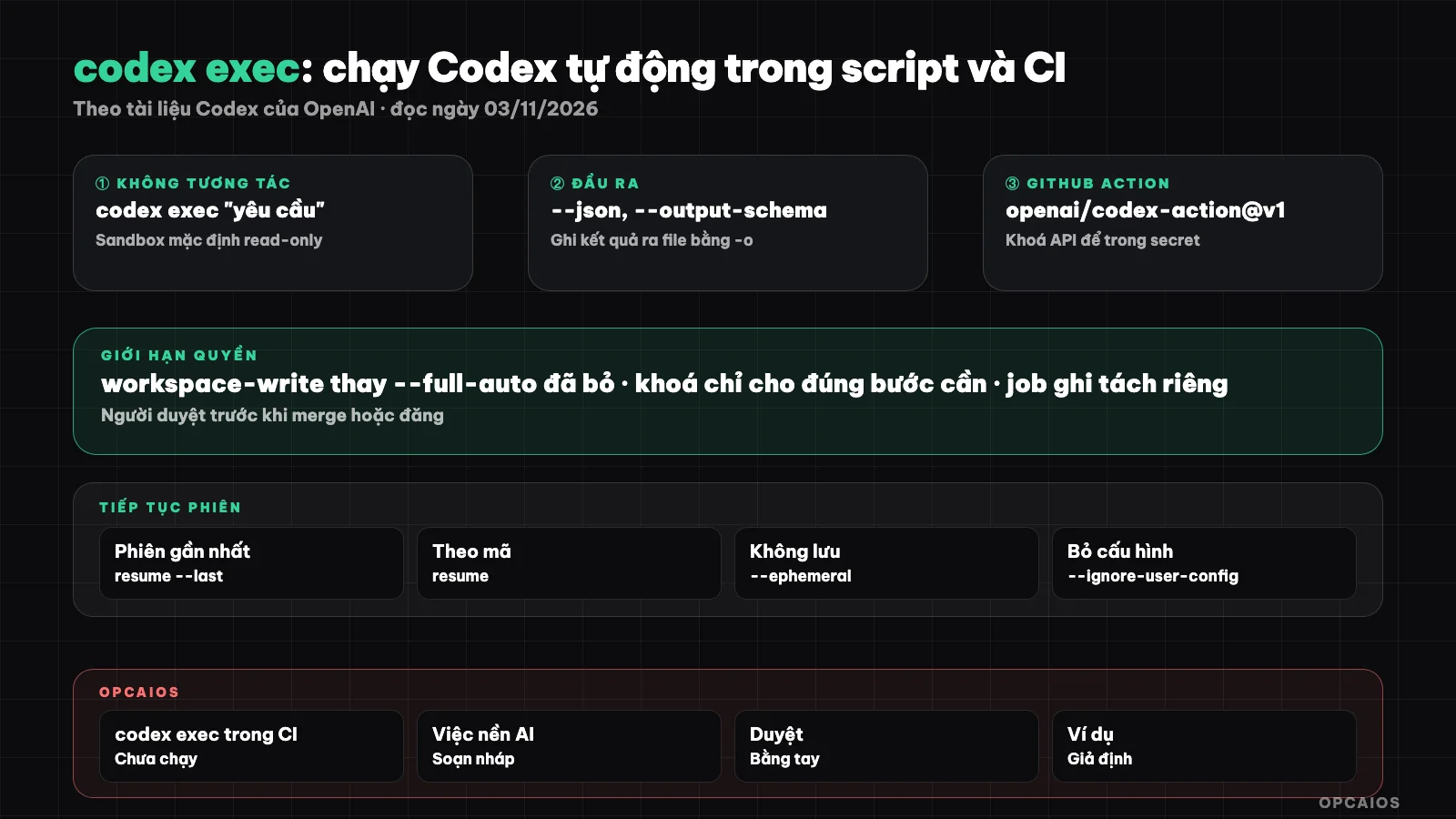
Trigger, run with narrow permissions, output results, reviewer is the last gate. Diagram: OPCAIOS.
How does the codex exec command run and what is it allowed to do by default?
The codex exec command runs Codex without opening an interactive terminal UI (TUI), and by default it is only read-only. According to the "Non-interactive mode" page on learn.chatgpt.com/docs (developers.openai.com/codex redirects there, read on 03/11/2026), the default sandbox for codex exec is read-only; to allow file edits you must choose --sandbox workspace-write. The docs note that the --full-auto flag is no longer supported, replaced by --sandbox workspace-write. The command requires running inside a Git repository; you can skip this only with --skip-git-repo-check when the environment is safe. According to codex exec --help version 0.162.1, if you don't pass a request (or pass -) the command reads from standard input. The docs say nothing about exit codes; don't assume anything until you test it yourself.
codex exec "summarize the repository structure"
Which codex exec flags matter when running in scripts?
The important flags of codex exec fall into 3 groups, all present in codex exec --help version 0.162.1 and described in the docs:
| Group | Flag | Purpose |
|---|---|---|
| Output | --json |
stdout becomes a JSON Lines stream, one event per line |
| Output | --output-schema <FILE> |
force the final answer to match a JSON Schema |
| Output | -o, --output-last-message <FILE> |
write the final answer to a file (still prints to stdout) |
| Permissions | -s, --sandbox |
read-only, workspace-write, or danger-full-access |
| Permissions | --approve-for-me |
shift approval requests to an auto-review mechanism, use with sandbox workspace-write |
| Reproducibility | --ephemeral |
don't save session files to disk |
| Reproducibility | --ignore-user-config, --ignore-rules |
ignore user's config.toml and .rules files |
There is also the --dangerously-bypass-approvals-and-sandbox flag, which the help text itself calls extremely dangerous, meant only for environments already isolated from the outside. What each sandbox mode means is explained in detail in the post approval modes and sandbox of Codex; config keys are in config.toml of Codex.
How do I use the JSON output and schema of codex exec?
The JSON output of codex exec is an event stream so scripts can track each step, while schema is a way to force the final answer into fixed-shape data. According to the docs (read on 03/11/2026), when you enable --json, event types include thread.started, turn.started, turn.completed, turn.failed, a group of item.* (agent messages, reasoning, executed commands, changed files, MCP tool calls, web searches, plan updates) and error. With --output-schema, you provide a JSON Schema file; the example in the docs sets "additionalProperties": false, and pair it with -o to save the result as a JSON file the next step can read. Always check that the result file exists and matches the schema before using it, because a run may fail partway through.
codex exec --json "summarize the repo structure" | jq
codex exec "Extract project metadata" \
  --output-schema ./schema.json \
  -o ./project-metadata.json

## How to Continue a Codex Exec Session?

Continuing a session means reusing the entire context from the previous run in the next run, using the `codex exec resume` subcommand. According to the documentation and `codex exec resume --help` in version 0.162.1, there are 2 ways: `--last` to get the most recent session, or pass the session code (UUID) or session name. For example in the documentation: first time finding race conditions, next time continuing the session to fix them. This division aligns with a process involving people: step one is read-only, people review then approve step two for writing. Note: sessions run with `--ephemeral` are not saved to disk, so they cannot be continued. The `review` subcommand runs code review; see [using Codex to review code](/en/blog/dung-codex-review-code).

```bash
codex exec "review the change for race conditions"
codex exec resume --last "fix the race conditions you found"
What is the Official Codex GitHub Action?
The official Codex GitHub Action is openai/codex-action, used as uses: openai/codex-action@v1, which installs the Codex CLI and runs codex exec within a GitHub Actions workflow. According to the "GitHub Action" page in the Codex documentation (read on 03/11/2026), the main inputs include:
openai-api-key: OpenAI key from secrets; the action sets up a proxy to protect the key, so the documentation recommends this approach over manually passing the key to a shell step.promptorprompt-file: write the request directly or provide a file path in the repo; use only one of the two.sandbox:workspace-write,read-onlyordanger-full-access.safety-strategy: defaultdrop-sudo(remove sudo privileges before Codex runs), other options areunprivileged-userandunsafe; Windows requiresunsafe.allow-users,allow-bots: who can trigger it; default is only people with write permissions to the repo.output-file,codex-args,model,codex-version: save results, add flags, choose model, pin CLI version.
The final-message output contains the final answer. Here's a simplified example from the documentation, where the Codex job only has read permissions:
jobs:
  codex:
    runs-on: ubuntu-latest
    permissions:
      contents: read
    outputs:
      final_message: ${{ steps.run_codex.outputs.final-message }}
    steps:
      - uses: actions/checkout@v5
        with:
          persist-credentials: false
      - id: run_codex
        uses: openai/codex-action@v1
        with:
          openai-api-key: ${{ secrets.OPENAI_API_KEY }}
          prompt-file: .github/codex/prompts/review.md
          output-file: codex-output.md
In the full example, the second job has pull-requests: write permissions to post results as comments.
How to Securely Authenticate Codex in CI?
Securely authenticating Codex in CI means the API key stays in secrets and is only given to the exact command that needs it. According to the "Non-interactive mode" page (read on 03/11/2026), codex exec by default reuses the saved login information from the CLI; in CI, set the CODEX_API_KEY environment variable on the command line of the call that needs the key. The documentation warns against setting OPENAI_API_KEY or CODEX_API_KEY at the job level in workflows that run code from the repo you control. Using ChatGPT login in CI is an advanced option for trusted runners; the documentation recommends against it for public repos or open source projects, since the auth.json file in the Codex directory contains access tokens. Three rules to follow:
- Keys only live in GitHub Secrets, not in workflow files or prompts.
- Give keys only to the Codex exec step, not to library installation or test steps.
- If a key is exposed, revoke it and create a new one immediately.
CODEX_API_KEY=<api-key> codex exec --json "triage open bug reports"
See also security when using AI to write code.
How to Limit Permissions and Have Someone Review?
Limiting permissions means giving each automated run only the minimum permissions it needs, and having someone review is the final gate before merging or publishing. The Codex documentation (read on 03/11/2026) recommends keeping the Codex job at contents: read, outputting patches as artifacts, then using a separate job with write permissions; only use danger-full-access in isolated environments; restrict who can trigger it; sanitize untrusted input to prevent prompt injection. The GitHub Action page also notes that read-only blocks file modifications and network access but Codex still runs with elevated privileges, so don't rely on it to protect secrets. Practical approach:
- Automated runs only create branches, pull requests or comments; enable branch protection rules.
- Content (posts, emails) goes to draft status only.
- Reviewers read the actual diff, not just AI summaries.
- Hard-to-undo actions (delete, send, publish, charge) are not in the automated run's permissions.
Example of daily codex exec workflow
A hypothetical workflow, not about a real person: someone selling courses wants each morning a summary of new reported errors and a draft for fixing small bugs.
- At 6 AM, a
scheduleworkflow callsopenai/codex-action@v1withsandbox: read-only, reads a list of new issues exported to a file and writes a categorization based on a JSON Schema. - The result is saved using
output-file, and a later job posts a summary comment in the tracking issue. - The owner reads, picks a small bug, and labels it for fixing.
- Another workflow runs with
workspace-write, fixes it on a new branch; the job has write permissions to open a pull request. - The owner runs
/reviewor reads the diff, tests pass, then merges.
When a run fails, it's usually just missing a summary. Each run costs tokens and GitHub runtime minutes; check OpenAI's official pricing page before scheduling frequent runs.
OPCAIOS experience
OPCAIOS has not run codex exec in CI or GitHub Actions yet, and has not used Codex in the cloud to open pull requests; the flags and workflow files in this post have not been tested on our own repositories. Codex CLI version 0.162.x and the Codex desktop app are only used in sessions with someone present, alongside Claude Code and Google Antigravity. The daily work on the website (choosing topics and writing SEO content, drafting GitHub repo introductions) calls AI through APIs and only creates drafts for review, not through Codex. When reviewing those drafts, we've had to fix spelling errors, truncated fields, and inflated ratings; the principle of "machine writes, human reviews" is what we apply in practice, just not yet for codex exec.
Frequently asked questions
How is codex exec different from running codex normally?
Running codex normally opens an interactive terminal interface for you to chat and approve each step. codex exec takes a request, completes it, and exits: the process writes to stderr, the final answer writes to stdout, so scripts and CI can read it. According to the documentation read on 03/11/2026, the default sandbox for codex exec is read-only, so you must explicitly choose --sandbox workspace-write to allow file editing.
Is the --full-auto flag still supported?
According to the "Non-interactive mode" page in the Codex documentation (read on 03/11/2026), --full-auto is no longer supported and should be replaced with --sandbox workspace-write. The codex exec --help section in version 0.162.1 also does not list this flag. If copying old scripts from the web, check each flag against --help in your installed version before adding it to CI.
Should I use CODEX_API_KEY or sign into ChatGPT in CI?
The Codex documentation recommends setting CODEX_API_KEY for each codex exec call that needs a key, while GitHub Action uses the openai-api-key input from a secret. Signing into ChatGPT in CI is described as an advanced option for trusted runners and should not be used with public repositories. For solo workers, a separate API key for CI with a spending limit is easier to revoke and separate from your personal account.
Should I let codex exec auto-merge to the main branch?
No. Automated runs should stop at comments, new branches, or pull requests. The Codex documentation recommends keeping the Codex job as read-only, moving patches to a separate job with write permissions, and restricting who can trigger the workflow. Auto-merging lets a single bug or injected command in an issue go straight into production.
Can someone without coding knowledge automate Codex?
Yes, at a simple level, starting with read-only operations like issue summaries or daily commit reports with sandbox: read-only, and always keeping results as drafts. The hard part is secrets, workflow permissions, and branch protection. Read more at safe workflow for using programming agents. For step-by-step guidance, see OPCAIOS's AI application training course.
Source: Codex documentation from OpenAI, pages "Non-interactive mode" and "GitHub Action" on learn.chatgpt.com/docs (developers.openai.com/codex redirects there), plus codex exec --help and codex exec resume --help from Codex CLI version 0.162.1, read on 03/11/2026; the daily workflow is hypothetical; the meaning of codex exec exit codes, API pricing, and the commands and workflows in this post have not been verified or tested. The experience is from OPCAIOS.
Translated from Vietnamese with AI. Read the original.
Want to apply this in your business?
Book a free 30-minute call (Vietnam time, in English or Vietnamese).