


What is MCP?
MCP (Model Context Protocol) is an open standard that helps AI applications like Claude, ChatGPT, or Cursor connect to external data and tools — files on your computer, Google Drive, CRM, websites, databases — in a unified way. Instead of each AI application having to write its own integration for every piece of software, the software only needs to create one "MCP server" and all AI applications that support MCP can use it. This post explains MCP in plain language, how it works, how to start using it, and the risks you need to know before plugging AI into your business data.
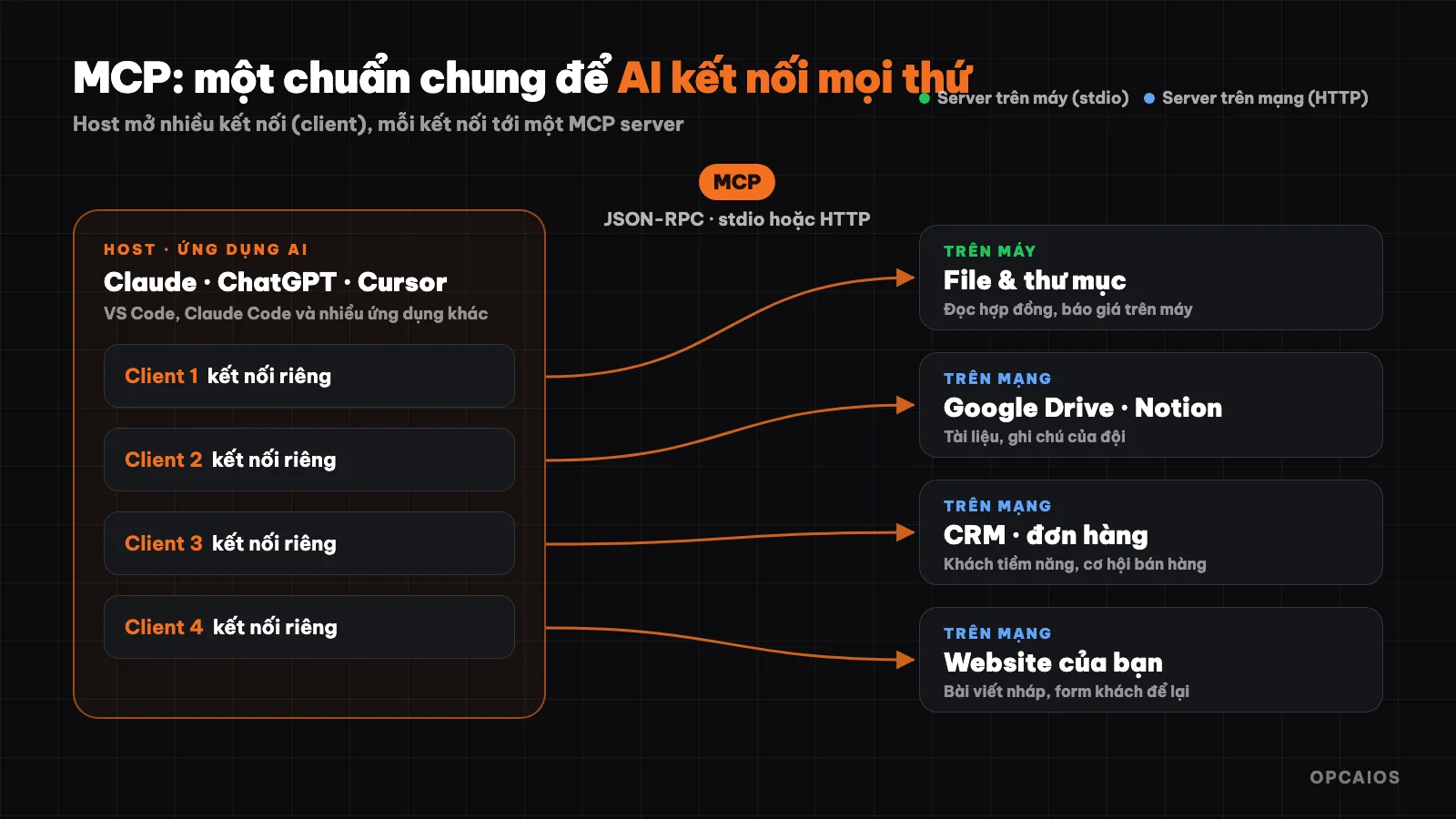
An AI application (host) opens multiple MCP connections, each connecting to an MCP server. Diagram: OPCAIOS.
What is MCP?
MCP (Model Context Protocol) is an open standard that helps AI applications connect to external systems in a unified way, and the official documentation compares MCP to the USB-C port for AI applications. USB-C is a common standard port for all kinds of devices, while MCP is a common standard between AI applications and data or tools.
Before MCP existed, if you wanted an AI assistant to read sales data, someone had to write a custom integration between the specific AI application and the specific sales software, then do it all over again if you switched applications. With MCP, the sales software only needs one MCP server, and Claude, ChatGPT, VS Code, and Cursor can all connect to it. Anthropic released MCP at the end of 2024 as open-source code (Anthropic), and the current specification version is 2026-07-28 according to the MCP specification page. MCP names versions by the date of breaking changes, and is supported by Microsoft's Visual Studio Code, Cursor, Anthropic's Claude, and OpenAI's ChatGPT.
What can MCP help AI do?
MCP helps AI read data and take actions in the systems you already use. There are three examples, according to the MCP introduction page: an AI assistant reads your Google Calendar and Notion notes, Claude Code builds an entire web app from a Figma design, and an internal chatbot connects multiple databases so employees can ask for data in plain language.
For a small business in Vietnam, more relevant examples include three tasks:
- Ask "how many customers left a form on our website this week?" and AI reads it from your system automatically instead of you opening each page.
- Ask AI to write a draft blog post and have it go straight into your website admin panel, waiting for your approval.
- Let AI read a folder of contracts on your computer to summarize the terms, without having to upload each file to the chat interface.
These three tasks are illustrative examples from OPCAIOS, not survey data.
How does MCP work?
MCP works with three roles: host, client, and server. One host can connect to multiple servers at once, and each connection is a separate client, according to the MCP introduction page.
| Role | What it is | Examples |
|---|---|---|
| Host | The AI application you are using | Claude Desktop, Claude Code, ChatGPT, VS Code, Cursor |
| Client | A connection inside the host, each client connects to one server | The host creates it, you don't need to do anything |
| Server | A program that provides data and tools to AI | A file-reading server, Google Drive server, CRM server, website server |
For example, Anthropic's Claude Code connects to a GitHub server, a database server, and a website server all at once, and each connection is a separate client. Under the hood, all messages follow the JSON-RPC 2.0 format, but you don't need to know the details if you're just using it, because the official SDKs handle that for anyone writing a server.
What three things does an MCP server provide?
An MCP server provides three things: tools, resources, and prompts. These three things are, according to the MCP introduction page:
- Tools: actions that AI can call, like creating a lead, sending an email, querying a database, drafting an article.
- Resources: data for AI to read as context, like file content, database records, API results.
- Prompts: pre-written request templates that help users call the right workflow without having to write it themselves.
In practice, tools are the most commonly used. For example, Claude reads the list of tools the server declares (name, description, parameters), decides which tool to call on its own, then uses the result to answer you.
Where does an MCP server run: on my machine or on the network?
An MCP server runs in two ways: locally on your machine or remotely on the Internet. These two ways differ in how they connect, according to the MCP introduction page:
- Local server (stdio): runs right on your machine, the host starts it as a child process. Good for reading files on your machine and controlling applications on your machine.
- Remote server (Streamable HTTP): runs on the Internet, the host connects over HTTP, usually logging in with OAuth or an API key. Good for online services like Sentry, Notion, or your own website.
For example, a server reading a contracts folder should run locally, while a Notion or Sentry server runs remotely.
How do I start using MCP?
In chat applications (Claude, ChatGPT)
Large AI assistants call remote MCP servers as "connectors". You go to the connector settings, choose an available service or paste the MCP server address, log in, then turn it on in the conversation. No need to install anything on your machine.
In Claude Code (command line)
Claude Code adds servers with the claude mcp add command:
# Remote server over HTTP
claude mcp add --transport http sentry https://mcp.sentry.dev/mcp

# Local server running via npx, passing key through environment variable
claude mcp add my-server -e API_KEY=xxx -- npx my-mcp-server

# See servers you've added
claude mcp list
By default a server only works in the current project; add --scope user to use it in all projects, or --scope project to share the config with your team via a .mcp.json file.
Test a server before using it
MCP Inspector is the official tool to open a server, see what tools and resources it declares, and test each tool. You should test with Inspector before plugging an unfamiliar server into an AI application that contains real data.
Real example: what can the opcaios.org MCP server do?
The opcaios.org MCP server is a dedicated server for AI assistants to work with this website's content and customers. The server declares three groups of tools, according to the site admin (checked on 22/10/2026):
- Content:
list_posts,get_post,check_post_seo,create_post,update_post,get_brand_voice(brand voice). - Customers and sales:
list_submissions(forms customers leave),list_contacts,create_lead,list_deals. - Short links:
create_link,get_link_analytics.
The important point is permission limits. Each connection gets a key with its own permissions, read-only or read and write, so the assistant can only use it to look up data and cannot accidentally edit data. Besides, the admin panel has a Review posts mode: when on, all posts the AI creates via MCP are only saved as drafts and go into a queue, posted to the website when the reviewer clicks approve.
What risks should I know before using MCP?
The main risk of MCP is that AI gets permission to touch real data and systems, so you need to be careful just like when granting permissions to a new employee. The official security documentation emphasizes five points, according to the MCP introduction page and Anthropic:
- Check the source before installing. Local servers run with your permissions: they can read files and execute commands. Only install servers from trustworthy developers.
- Treat tool descriptions as untrusted data. A malicious server can hide instructions in tool descriptions, and content that AI reads can also contain injected commands, known as prompt injection.
- Grant minimum permissions. Start with read-only access, limit directories, give each server its own API key.
- Keep a review step for irreversible actions: sending emails, deleting data, transferring money, publishing posts.
- Run in isolation when possible. Unfamiliar servers should run in a container or virtual machine.
Where should I start using MCP?
Start with a repeating weekly task that needs data from one system, with read-only permissions. Four steps in order:
- Choose a weekly repeating task, for example summarizing form submissions or looking up orders.
- Find an existing MCP server for that system (many large services already have official servers; see MCP Registry or the MCP Servers list).
- Connect with read-only permissions, try it for 1 week.
- Only grant write permissions once you trust the results, and always include a review step.
If you want to write your own MCP server, Hugging Face's free course is a good starting point; see the post MCP Course Hugging Face: A–Z guide. A summary of the protocol is on the Model Context Protocol page in the Utilities library.
Frequently asked questions
Is MCP free?
Yes. MCP is an open standard, and the specification and official SDKs are all open source. Any cost comes from the AI application you use or the service behind the MCP server, such as Claude's plan, ChatGPT, or your CRM service. Since pricing changes over time, check each service's official pricing page; this post doesn't list specific numbers because OPCAIOS hasn't verified pricing tables. For example, a server that reads files on your machine costs nothing extra beyond the AI application you're using.
Can MCP only be used with Claude?
No. MCP was initiated by Anthropic but is an open standard, so OpenAI's ChatGPT, Microsoft's Visual Studio Code, Cursor, and many other applications support it. One MCP server written once can work with any AI application that supports this standard, according to the MCP introduction page. Ultimately, specific support in each application changes by version, so check the application's documentation before installing.
How is MCP different from an API?
An API is each software's own door, with a different style for each one, while MCP is a standardization layer on top. An MCP server usually calls the underlying software's API, but presents it again in a common format that every AI application supporting MCP understands, along with descriptions so the AI knows when to use which tool. For example, opcaios.org's MCP server calls an internal API to create draft posts, but users just send Claude a message. See also the post What is an API.
Can I use MCP without knowing how to code?
Yes, if you use a connector already built into Claude or ChatGPT: just turn it on and log in. Writing your own MCP server or installing a local server requires knowing a little about the command line. First try a read-only connector, then get comfortable seeing which tools AI calls, and finally think about installing a local server. To learn properly for a small group, see AI application training.
Is using MCP safe?
It's as safe as you set permissions carefully. Only install servers from trusted sources, according to the MCP introduction page, start with read-only permissions, and keep a review step for every irreversible action like sending emails, deleting data, or publishing posts. For example, on opcaios.org, the Review mode keeps all AI-created posts in draft status until someone clicks approve.
Source: official Model Context Protocol documentation (specification 2026-07-28: introduction, architecture, local server security), claude mcp add --help command. Updated 22/10/2026.
Translated from Vietnamese with AI. Read the original.
Want to apply this in your business?
Book a free 30-minute call (Vietnam time, in English or Vietnamese).