


Agent Manager in Antigravity: What Is It?
Agent Manager is the orchestration layer of Google Antigravity, where one person opens multiple conversations with agents at the same time, tracks each agent, reviews permission requests, and steps in to redirect an agent when it goes off course. According to official documentation (read 03/11/2026), the Antigravity application "evolved from Agent Manager" into a standalone desktop application, while in the Antigravity CLI the /agents command opens a panel bearing the exact name Agent Manager. This post does not promise that running in parallel will be faster by how many times: OPCAIOS has not yet measured productivity. The post covers how to assign work, track, intervene, subagents, /teamwork, and when parallelism helps or causes trouble. The general introduction section is in the post What is Antigravity?.
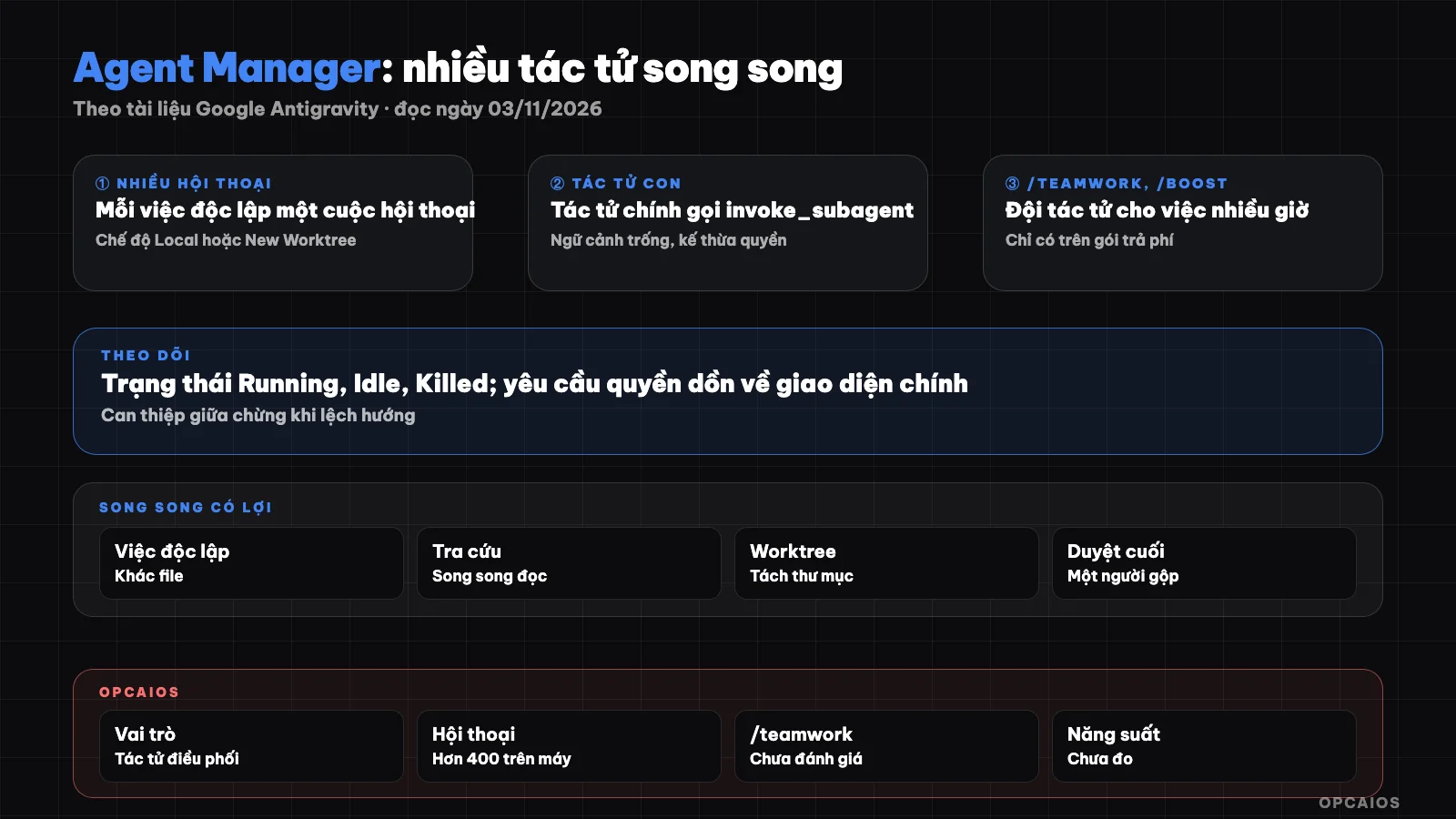
Agent Manager: multiple conversations, subagents and agent teams in one place to track. Diagram: OPCAIOS.
Where is Agent Manager in Antigravity Located?
Agent Manager in Antigravity currently appears in three places with different names. According to the official changelog, the first release on 18/11/2025 was an IDE with a new "Agent Manager view". The Antigravity IDE agent page still mentions Agent Manager and opening multiple conversations in parallel. The Antigravity application is described in the overview documentation (read 03/11/2026) as the place to launch, orchestrate and inspect agent teams, with a sidebar split by project, conversation history and Automations section. Antigravity CLI version 1.4.12 has the /agents command that opens the Agent Manager panel to select custom-defined agents and monitor background subagents.
How to Assign Multiple Tasks at Once in Agent Manager?
Assigning multiple tasks at once in Agent Manager has two ways: open multiple conversations yourself, or let the main agent split tasks to subagents. The first way works when the tasks are independent and you want to manage each task yourself. According to the Projects page (read 03/11/2026), each new conversation has a worktree selector with two modes:
- Local mode: the agent works directly on the folder or Git checkout currently open, suitable for quick fixes.
- New worktree mode: creates a new Git worktree for the conversation, keeps the main folder untouched and prevents parallel agents from colliding with each other.
One project can comprise multiple directories, for example one frontend repo and one backend repo, and have separate permissions settings. The second way is to assign one big task then let the main agent call subagents. Example scenario: a web developer opens three conversations, one writes tests in a new worktree, one reads old code to write documentation, one fixes UI bugs in Local mode.
How to Track and Intervene While Multiple Agents Are Running?
Tracking in Agent Manager means seeing the status, current step and pending approval requests of each agent, then stepping in at the right moment. According to the Custom subagents page (read 03/11/2026), on the application you open the Subagents section in the Overview panel to view each subagent's conversation. If you want to change instructions without going through the main agent, you type directly in the subagent's message box. On CLI, the /agents panel shows the code, role, status and current step of each agent. Four main intervention actions:
- Stop a subagent: Stop Subagent button on the app, K key in CLI
/agents. - Approve permissions right in the panel: A or D keys; Alt+J jumps to the subagent waiting for approval; Ctrl+K approves quickly.
- Message a subagent directly on CLI: start with
@and the subagent name. - Track background tasks not part of an agent using
/tasks.
When a subagent needs permission, the request automatically floats up to the main interface, so you don't have to open each window to find it.
How do subagents in Antigravity work?
A subagent in Antigravity is a parallel work session called by the main agent through the invoke_subagent tool, with its own role and starting with an empty context. According to the Custom subagents page (read 03/11/2026), a subagent has three workspace options: inherit a shared directory with the parent agent, create its own worktree, or share a repository directory. Antigravity comes with three built-in subagents: research for code inspection, browser for browser testing via /browser, and self which is a copy of the calling agent. You can define custom subagents using a Markdown file with YAML frontmatter in .agents/agents/ of your project, with keys like name, description, tools, model, and commandExecutionPolicy. A subagent has three states: Running, Idle, and Killed. An Idle agent will restart when it receives a message and still remembers previous work. Maximum nesting depth is 10 levels. A subagent inherits permissions, directory scope, and sandbox from its parent agent. Known issue: misspelling a tool name in tools can cause the subagent to hang. For general concepts, see What is a subagent?.
How do /teamwork and /boost differ from opening multiple agents yourself?
/teamwork is agent team mode for projects lasting many hours to many days, while /boost is multi-agent reasoning chains for a single difficult problem in one work session. According to documentation read on 03/11/2026, both are only available on paid plans. The main difference is you don't divide the work yourself. /teamwork has two phases:
- Interview phase: the main agent asks about scope, requirements, verification methods, acceptance criteria, then creates an artifact with a prompt for your review.
- Self-run phase: Sentinel coordinates, Project Orchestrator sets milestones, Explorers read-only, Workers write code; Critic, Challenger, Auditor, and Success Auditor check independently.
A key lesson is the file ownership rule: the Orchestrator assigns each file to each Worker, and two Workers never edit the same file at the same time. According to the Boost page, /boost runs in a temporary worktree, while /teamwork uses a separate worktree for each milestone.
When is running multiple agents in parallel beneficial?
Running multiple agents in parallel is beneficial when the tasks are independent by file, have clear completion criteria, and the user has time to review each result. Four reasonable cases, drawn from how Antigravity's documentation describes subagents and /teamwork rules:
- Read-only inspection: the research subagent reads code, traces function calls, doesn't write files so no conflicts.
- Heavy background work: run tests, builds, code scans while you continue other work.
- Isolated modules: each agent edits a separate directory in its own worktree.
- Cross-check: one agent writes, another reads-only to find bugs, like the Critic role.
Hypothetical example: an online shop owner asks one agent to write a return policy page, one subagent checks for broken links across the whole site. For long tasks, the /goal command keeps the agent from stopping early and still waits for subagents to finish.
When does running in parallel cause trouble: file conflicts and quota costs?
Running in parallel causes trouble when multiple agents touch the same file or resource, or when total work exceeds quota limits and your review capacity. Five common risks:
- File conflicts: two agents in Local mode edit the same file, the later version overwrites the earlier. Mitigation: New Worktree mode and the one-file-one-owner rule.
- Shared resources: same test server running, same database migration, same commit. Worktree can't isolate a database.
- Quota costs: according to the Plans page (read 03/11/2026), usage limits relate to work volume, complex tasks consume more. Free plan resets weekly; Google AI Pro and Ultra reset yearly until reaching weekly limits.
- Review bottleneck: five agents finish at once means five sets of changes to read.
- Permission spread: a subagent inherits permissions from its parent agent, so Turbo mode on the main agent expands to the whole tree.
For threading multiple sessions on one repository, see multiple AI sessions editing one project; for permissions, see safety modes in Antigravity.
OPCAIOS's Experience
In OPCAIOS's setup, Antigravity acts as a coordination agent on a Mac: managing infrastructure, delivering, and tracking work. This machine runs Antigravity version 2.28.x, Antigravity IDE version 2.5.x, and the CLI agy version 1.4.12, used alongside Claude Code and Codex (see using Codex and Claude Code at the same time). Antigravity has handled some website administration features, such as tracking a Dream 100 list on Facebook and X, and editing menus. Four lessons learned:
- Website code is only edited and deployed from a single machine, after encountering over 1,500 different files caused just by line ending differences when deploying from a Windows machine.
- A shared AGENTS.md file sets the order for reading documentation at the start of a session and logging at the end via a shared status file.
- The machine has over 400 stored Antigravity conversations locally (counted by folder, not by reading contents), requiring clear naming and regular cleanup.
- Hooks currently only report session status to one terminal management tool, with no command-blocking hooks yet.
We have not used the Antigravity SDK, have not used Remote Control, do not have enough experience to evaluate /teamwork or /boost, and have no productivity metrics.
Frequently Asked Questions
Is Agent Manager in Antigravity free?
Opening multiple conversations and using sub-agents is available on all plans: the Plans page (read 03/11/2026) states that all plans include the product features. Only /teamwork and /boost are available on paid plans. The free plan has a weekly refresh limit, and since the limit correlates with workload volume, running many agents at once will exhaust it faster.
Should I choose Local mode or New Worktree mode?
Choose Local mode when only one agent edits files, when agents only read, or when small tasks need immediate review in the open folder. Choose New Worktree mode when two or more agents write to files in one Git repository, or when large tasks require keeping the main folder clean. Worktree only separates source code; the database, test port, and files outside the repository are still shared, so work must still be divided carefully.
Do sub-agents remember the main agent's conversation?
No. According to the Custom subagents documentation, a sub-agent starts with empty context and only receives the role and task instructions given by the main agent. This approach keeps context lean, but the task instructions must be complete: objective, file scope, completion criteria. When a sub-agent finishes work and moves to Idle, sending another message will wake it up, and it will still remember the previous part of the task.
How do I stop a sub-agent that's running too long?
In the Antigravity app, open the sub-agent in the Subagents section and press Stop Subagent. In the CLI, type /agents, select the running line, then press K; this action stops all sub-agents under it. A stopped agent cannot be restarted, but the conversation record is still readable.
Should newcomers run many agents in parallel right away?
No. Start with one agent, one task, review-required permission mode, and learn how to read the plan and changes before approving, see Artifacts in Antigravity. Once comfortable, add one read-only sub-agent for surveying, then move to many agents writing files in separate worktrees. To learn a controlled agent programming workflow, see OPCAIOS's AI application training course.
Source: Google Antigravity documentation at antigravity.google/docs: overview, features, agent, subagents, teamwork, boost, projects, plans, commands/goal, cli/commands/agents, at-mentions, agent-settings, changelog (read 03/11/2026); CLI flags cross-checked using agy --help version 1.4.12. Not verified: when Agent Manager was removed from IDE, actual effectiveness of /teamwork and /boost, specific consumption rate when running in parallel. Experience is OPCAIOS's.
Translated from Vietnamese with AI. Read the original.
Want to apply this in your business?
Book a free 30-minute call (Vietnam time, in English or Vietnamese).