



AI writes code with wrong version
AI writes code for the wrong version is a model error where AI generates code that runs correctly with an old library version but breaks on the version you're using. The main reason is that training data stops at a point in time, while the library continues to rename functions, change how they're called, and remove features. There are four ways to fix it: specify the version clearly in your prompt, let AI read your project's version declaration file, run the code on a machine to test it, and patch only the wrong part instead of rewriting it.
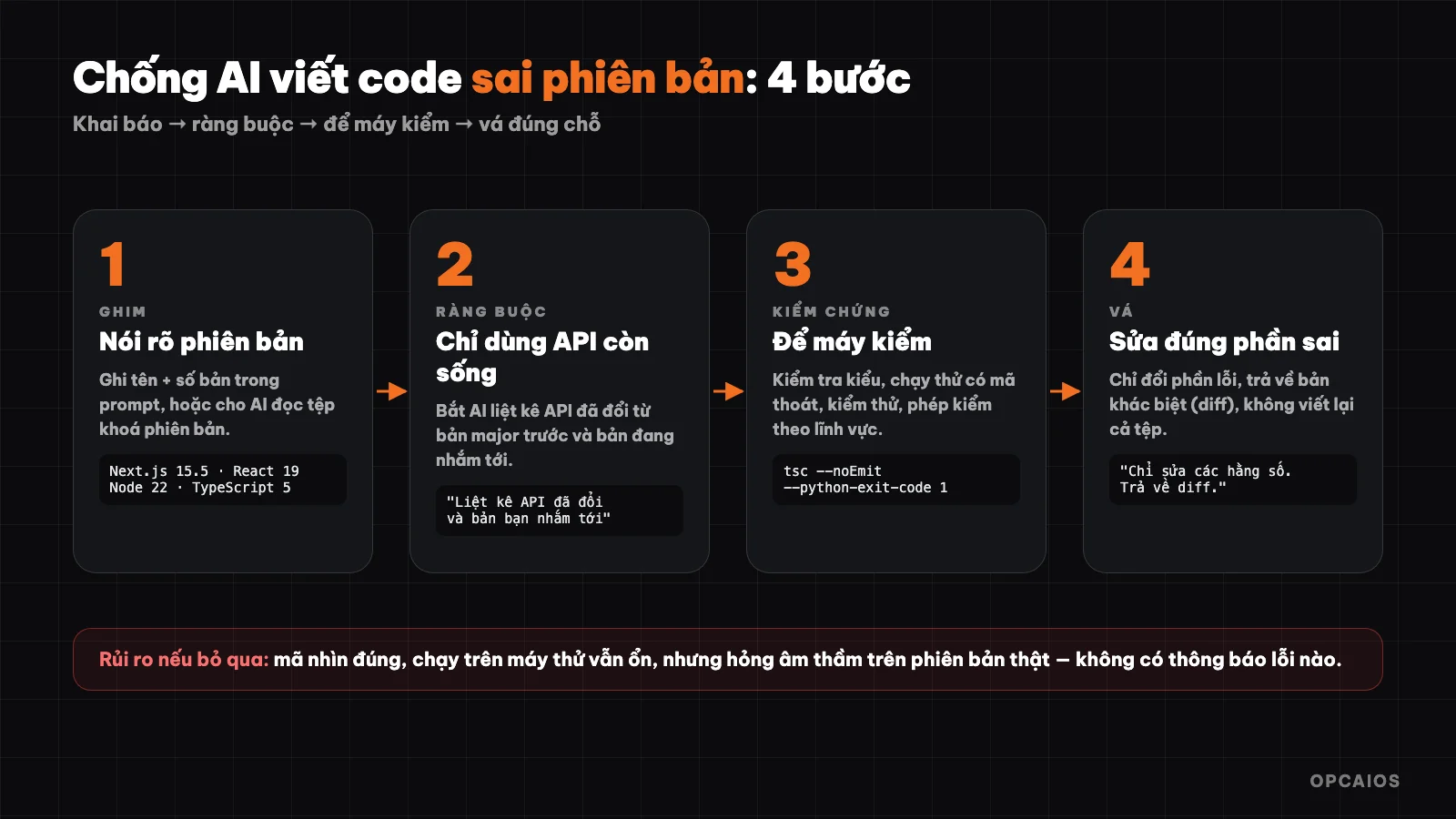
Four steps to keep code written by AI matching the version you're using. Diagram: OPCAIOS.
What is AI writing code with wrong version?
Version mismatch error is the situation where an AI model writes code the way an old library version used to work, while your project runs a newer version. The code looks reasonable, has correct syntax, has correct function names that once existed, but runs into an error or, worse, produces wrong results without reporting an error. Three common forms in 2026 are:
- Function deleted or renamed: the old command no longer exists in the new version.
- Default value changed: the same command but different behavior.
- Call changed from synchronous to asynchronous: code misses the wait step so data comes back empty.
Example: a programmer asks ChatGPT from OpenAI or Claude from Anthropic to write a snippet to fetch login cookies for a Next.js website. The code uses the synchronous call from the old version, while the project has moved to Next.js 15, where this function became asynchronous per Next.js (Vercel). The page still builds on your personal machine with test data, but real customers logging in get back an empty value. Because there's no red warning, the error falls into the silent error group and only shows up after running for real, sometimes after dozens of attempts.
Why does AI often write code for old versions?
An AI model writes code for old versions because its training data has a cutoff, and the amount of documentation for old versions is always greater than for new versions. When a library releases a major new version, tutorials, forum questions, and sample code for that version only exist for a few weeks, while the old version has accumulated many years. The model leans toward whichever way of doing things appears most often, and that way usually belongs to the old version. The model also doesn't know on its own what day today is, unless the user or a tool provides it.
An example cited by @0xCodio on X (10/11/2026) about Blender, open-source 3D modeling software with a Python scripting interface: the EEVEE renderer name changed from BLENDER_EEVEE to BLENDER_EEVEE_NEXT in version 4.2, then changed back to BLENDER_EEVEE in version 5.0. The model learned the change in between correctly but got it wrong in the latest version, which according to Blender (2026) is version 5.0. The problem lies in missing the target, not in reasoning ability.
How serious is this?
The severity of version mismatch error is the point drop between the old version and the new version of the same tool. According to a post by @0xCodio on X (10/11/2026), the author ran a set of 30 Blender code-writing tasks on four Blender versions with ten models, totaling 1,190 answers scored by code execution. This data is from the original author; OPCAIOS has not independently verified it, but it shows a clear trend:
| Metric | Blender 3.6 | Blender 5.0 |
|---|---|---|
| Code execution rate | 91% | 70% |
| Model correctly states what changed | 81% | 35% |
In addition, three groups of tasks (compositor, boolean solver, sequencer) scored 0 points across all models on Blender 5.0. What's worth noting is that the rate at which models recognize they're using an old API dropped from 81% to 35%, more steeply than the code execution rate drop. So AI doesn't warn itself when writing the wrong version.
How do you pin the version in your prompt?
Pinning the version means writing down the name and version number of every tool involved right at the start of your request, then making AI repeat back the version it used for each important API. These two steps turn an implicit understanding into something you can check. A prompt template that works for most projects:
Environment: Next.js 15.5, React 19, Node 22, TypeScript 5.
Only use APIs that still exist in these versions.
After the code, list every API that changed from the previous major version
and state clearly which version you're targeting.
With Claude Code from Anthropic or similar tools that can read your project folder, a better way is to let AI read package.json, requirements.txt, or a version lock file, because the real versions live in the file. With Blender, the blender --version command returns the exact version number to paste into your request. OPCAIOS's estimate is this takes less than 1 minute per working session but eliminates the most common cause of version mismatch error.
How to Let Machines Verify Instead of Human Eyes?
Machine verification means every piece of code AI writes must pass an automated test, and that test stops the process when something breaks. Human eyes reviewing code easily miss version-related errors because the code looks reasonable, but machines run tests and report directly. According to OPCAIOS's approach, a programmer using Claude from Anthropic or ChatGPT from OpenAI should set up four layers of checks in 2026, ranging from cheap to expensive, each running in a few minutes:
- Type checking and compilation: catch nonexistent functions and wrong parameters before running, for example using TypeScript.
- Test runs with exit codes: broken scripts must make the system auto-report red, not green.
- Unit tests for critical parts: results match sample data.
- Domain-specific verification checks: for a 3D model to print in Blender, check for unclosed edges and degenerate faces with code, because renders still look good even when the object is broken.
General principle: let machines check what machines can check, and use human eyes only for what machines cannot measure. The detailed process for Blender is in the post AI writes Python for Blender.
Any Real Examples When Upgrading to Next.js 15?
A relatable example for web makers is opcaios.org itself when upgrading to Next.js 15 and React 19 in 2026: we ran into exactly this kind of error. According to Next.js's official upgrade docs, from version 15 onward functions like cookies() and the params parameter of pages become asynchronous and must use await. Code AI generates from old habits still looks correct, but running it fails or returns empty.
An effective fix has two steps. First, state the Next.js version in the prompt. Next, run TypeScript type checking (by Microsoft) after each AI edit; this tool catches most missing await before code goes to the server, so errors show up on your machine instead of when users log in. This is OPCAIOS's experience during the upgrade, not general statistics.
When Should I Have AI Look Up Docs Instead of Relying on Memory?
Having AI look up official docs makes sense when a library changes fast or just released a major version. Instead of depending on stale memory, AI reads the current docs page and then writes code.
The common way is to use MCP, a standard that lets AI apps read outside data and tools. Some library providers run MCP servers that return docs for the right version. If you're new to it, read What is MCP? first. Note security: MCP servers run code or read real data, so only install from trusted sources and grant read-only permission first. Without MCP, the manual way still works well: open the library's upgrade guide, paste the section listing breaking changes into your request, then tell AI to apply that list exactly. The list written by the developer is more reliable than the model's memory.
What Checklist Helps AI Code Match the Version?
A checklist is a list of seven tasks in order to make code AI writes match the version you're using, whether it's Next.js, Python, Blender, or another tool. Each step takes a few minutes, from Claude at Anthropic's experience, but blocks one specific group of errors, from wrong function calls to silent wrong results:
- Write the exact version of every library in the prompt, or have AI read the lock file.
- Ask AI to list APIs that changed and which version you're targeting.
- Set it up so real errors actually stop the process.
- Run type checking or compilation after each fix.
- Write at least one automated test for important results.
- When something's wrong, ask AI to patch the wrong part and return a diff, not rewrite the whole file.
- For new or fast-changing libraries, have AI look up current docs before writing, for example through MCP.
Frequently Asked Questions
Why does AI-written code have bugs even though it looks correct?
The code looks correct because it matches common usage patterns in the data the AI learned from. Bugs only appear when you run it on a newer version, where function names or calling conventions have changed.
Is specifying the version in the prompt enough?
Not quite. Specifying the version helps reduce bugs but doesn't eliminate them entirely. You need an extra step—running a test or type checking—so the machine confirms the code actually works on that version.
Should I have AI read the documentation or trust the model's memory?
With stable libraries, the model's memory is usually sufficient. With libraries that just released a major version or change frequently, have AI read current documentation, for example via MCP or by pasting relevant documentation pages into your request.
Does version mismatch error only happen with one specific AI model?
No. According to benchmark testing across ten models that @0xCodio shared, the trend of lower scores on newer versions appears across many different models. Switching to a different model doesn't replace pinning the version and verifying the code.
Do non-programmers need to care about this?
Yes, if you ask AI to write scripts to automate your work, because a version-mismatched script can run and produce wrong results without reporting an error. Do two things: ask AI which version it's targeting, then request a test run with sample data before using it for real. For example, an office worker who asks ChatGPT from OpenAI to write a spreadsheet processing script should clearly state which Python and Excel versions they're using. To learn how to use AI safely in business, check out the AI application training course.
Source: benchmark data and Blender example from @0xCodio's post on X (11/10/2026), not independently verified; Next.js 15 example is from OPCAIOS's experience.
Translated from Vietnamese with AI. Read the original.
Want to apply this in your business?
Book a free 30-minute call (Vietnam time, in English or Vietnamese).