


What is MCP in Antigravity?
MCP (Model Context Protocol) in Antigravity is how I connect Google Antigravity agents with external tools like databases, GitHub, Figma, or private APIs, so agents read real data and call actions instead of waiting for me to paste information into the chat box. Along with MCP come skills (directories containing SKILL.md that guide agents to do a task) and plugins (packages that bundle skills, MCPs, sub-agents, rules, and hooks). This post makes no promises about the safety or effectiveness of any tool; I haven't checked the code of any plugin in the Marketplace, and only describe what the official documentation and agy --help version 1.4.12 say, read on 03/11/2026. The post covers how to add MCP servers, skills, plugins, hooks, risks, and comparisons with Claude Code and Codex. General introduction is in What is Antigravity?.
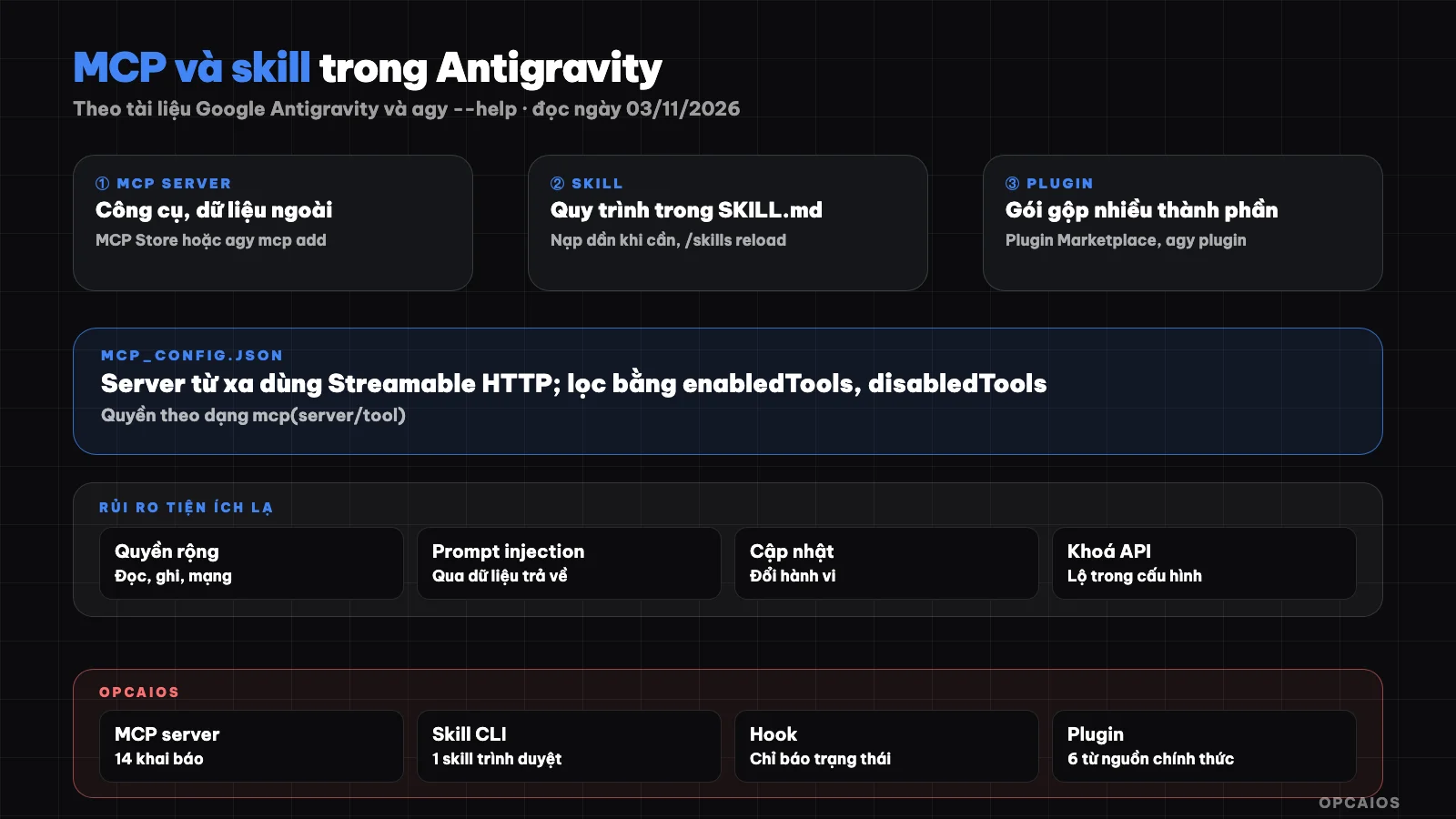
Three layers of extending an agent in Antigravity: MCP, skill, and plugin, sitting below the permissions layer. Diagram: OPCAIOS.
How are MCP, skill, and plugin different in Antigravity?
MCP, skill, and plugin are three different layers of extending an Antigravity agent, according to pages /docs/mcp, /docs/skills, and /docs/plugins (read on 03/11/2026). MCP adds tools and data to agents: an MCP server is a program running locally (stdio) or a remote service that publishes tools for agents to call. Skill adds ways of working: a directory with SKILL.md containing processes, checklists, and possibly scripts; agents only see the name and description until they need to read the full thing. Plugin is how I package and distribute: a directory with plugin.json, bundling skills, MCP servers, sub-agents, rules, and hooks, installed with one command and toggled together. If you're new to this, see What is MCP?.
| Layer | Adds to agent | Main file |
|---|---|---|
| MCP server | External tools, data | mcp_config.json |
| Skill | Process, knowledge | SKILL.md |
| Plugin | Bundle of multiple parts | plugin.json |
How do I add an MCP server in the Antigravity app?
I add an MCP server in the Antigravity app through the built-in MCP Store, according to page /docs/mcp (read on 03/11/2026):
- Click Settings in the bottom left corner.
- Select Customizations, see the Installed MCP Servers section.
- Click Add MCP to open the MCP Store.
- Find the server, click Add, sign in if asked.
The Store is organized by group like databases (Supabase, Neon, BigQuery), development tools (GitHub, Linear, Vercel), and design (Figma, Canva). For servers not in the Store, I edit mcp_config.json directly; the Antigravity IDE has a similar Store.
How do I add an MCP server with agy mcp add?
I add an MCP server with Antigravity CLI two ways: open the manager with /mcp in the interactive interface, or use agy mcp from the shell, according to agy mcp add --help version 1.4.12 (read on 03/11/2026). The syntax is server name, then run command (stdio server) or URL (http server), then parameters. The --env (-e) flag passes environment variables, --header (-H) adds HTTP headers, --type (-t) chooses stdio or http; http and https URLs are auto-detected so usually no need for --type. Note: flags must come before the server name, and use -- before the command if the command starts with a dash. Other subcommands include list, remove, enable, disable. According to page /docs/mcp, CLI reads servers from a global file for all projects and from .agents/mcp_config.json in the workspace; enabled plugins can also add servers. Examples taken from the help:
agy mcp add fs npx -y @modelcontextprotocol/server-filesystem /work
agy mcp list

## What should I pay attention to when configuring mcp_config.json?

Antigravity's `mcp_config.json` file uses a common structure across applications, IDEs, CLI, and plugins: at its root is an `mcpServers` object, with each key being a server name, according to the /docs/mcp page (read on 03/11/2026). Each server has exactly one connection type: `command` for a stdio server or `serverUrl` for a remote server. Remote servers must use Streamable HTTP; the old HTTP+SSE type and the `httpUrl` key are no longer supported. Some useful optional keys:

1. **`enabledTools`, `disabledTools`:** control which tools agents see, reducing risk and context size.
2. **`disabled`:** temporarily turn off a server without deleting its configuration.
3. **`timeoutSeconds`:** by default waits 5 minutes for connection, 3 minutes per tool call; negative values disable limits.
4. **`headers`, `oauth`, `authProviderType`:** authenticate via headers, OAuth, or Google Cloud credentials.

On permissions, MCP tools have no default configuration in ask mode. You can allow them at three levels: `mcp(server/tool)`, `mcp(server/*)`, and `mcp(*)`. The safe approach is to allow only read-only tools, keeping ask mode for write or delete tools. API keys in `headers` are in plain text, so don't put this file in a public code repository. See more at [safe mode in Antigravity](/en/blog/che-do-an-toan-trong-antigravity).

## How do Skills work in Antigravity?

A Skill in Antigravity is a folder containing a required SKILL.md file, optionally with `scripts/`, `examples/`, `resources/` subdirectories, according to the /docs/skills page (read on 03/11/2026). The YAML frontmatter has a required `description` and optional `name`. Skills load progressively: each turn, the agent only sees the name and description of every skill; when a skill matches the request, the agent reads the full SKILL.md then follows it. So the description needs clear keywords. Workspace-level skills go in `.agents/skills/`, and global skills are shared across applications and CLI. In the CLI, each skill becomes its own slash command, for example the `deploy-staging` skill becomes the `/deploy-staging` command; if you add a skill while CLI is running, type `/skills reload`. According to the /docs/migration/workflows-to-skills page, old workflows stopped working on 19/10/2026 and the `/migrate-workflows` command helps switch to skills; Antigravity follows the open Agent Skills standard from May 2026, so compliant skills can be reused in other tools.

## What are Plugins and the Plugin Marketplace?

A Plugin in Antigravity is a versioned package that bundles five component types: skills, MCP servers, custom agents and sub-agents, rules, and hooks, according to the /docs/plugins page (read on 03/11/2026). The Plugin Marketplace is Google's and partners' catalog of plugins, announced on the Antigravity blog on 29/10/2026, usable in applications and CLI. In the application, open Customizations then Marketplace; in the CLI, type `/plugin`. Plugins installed in the application automatically sync to the CLI. From shell, per `agy plugin --help`:

| Command | Action |
|---|---|
| `agy plugin install <name>` | Install from the official Marketplace, a GitHub URL, or a local folder |
| `agy plugin import gemini` or `claude` | Import a Gemini CLI extension or Claude Code plugin |
| `agy plugin list --json` | List plugins, components, and paths |
| `agy plugin validate --strict` | Check manifest and files |

A plugin's MCP tools are named as `<plugin>_<server>`. Plugins requiring API keys install in off state until you fill in the keys.

## What are Hooks in Antigravity used for?

Hooks in Antigravity are shell commands that run at fixed points in the agent loop, declared in `hooks.json` in the workspace, globally, or in a plugin, according to the /docs/hooks page (read on 03/11/2026). There are six events: SessionStart, PreToolUse, PostToolUse, PreInvocation, PostInvocation, and Stop. PreToolUse hooks return a `decision` field like `allow`, `deny` (block immediately), `ask`, `force_ask`, and can modify parameters before the tool runs. This is where you place a safety net for MCP; for example, a hypothetical hook blocks all delete commands on the data folder. In the CLI, `/hooks` lists active hooks.

## What are the risks of installing unfamiliar MCP, skills, and plugins?

The biggest risk with unfamiliar utilities is that they run with the permissions of the user on your machine. This is an analysis from OPCAIOS based on how the documentation describes the mechanism, not a warning extracted from Google:

1. **Hooks in plugins run automatically** when the plugin is enabled, meaning a plugin can execute shell commands without the agent calling them.
2. **MCP server stdio is a local program:** installing from an unfamiliar package is like installing unfamiliar software.
3. **SKILL.md is an instruction for the agent:** a single skill can order the agent to send data outside.
4. **Data via MCP can contain embedded commands** targeting the agent (command injection).

Ways to reduce risk: prioritize official plugins, read hooks.json and SKILL.md before installing from GitHub, limit tools using `enabledTools`, and use narrow-scope keys. See security when using AI to write code.

## How does Antigravity compare to Claude Code and Codex?

All three tools have MCP and plugin management commands, but they differ in syntax and storage location, according to the CLI help on our machine (Antigravity CLI 1.4.12, Claude Code 2.1.317, Codex CLI 0.162.1, as of 03/11/2026):

| Task | Antigravity CLI | Claude Code | Codex CLI |
|---|---|---|---|
| Add MCP | `agy mcp add` | `claude mcp add` | `codex mcp add` |
| Config file | `mcp_config.json` | Claude Code's own config | `config.toml` |
| Plugin | `agy plugin` | `claude plugin` | `codex plugin` (has marketplace management) |
| Import from other tools | `agy plugin import gemini/claude` | `claude mcp add-from-claude-desktop` | Not found in help |

Details on the Codex side are in the post [MCP, skills, and hooks in Codex](/en/blog/mcp-skill-va-hooks-trong-codex).

## OPCAIOS experience

The Antigravity application on OPCAIOS's main Mac declares 14 MCP servers; CLI `agy` 1.4.12 has one additional browser skill installed, and the user-level skill directory has one coordination skill for our terminal management tool. Hooks exist at points before and after the agent and before and after tools, but only for reporting session status; we don't yet have command-blocking hooks. There is exactly one global workflow file but it's an empty template, not actually used. The command `agy plugin list` on 03/11/2026 shows the CLI has 6 plugins, all from Google's official source (for example Chrome DevTools plugin, Firebase); we haven't yet confirmed which plugins come preinstalled versus which the agent installed, haven't installed any third-party plugins, haven't run `agy plugin import`, and haven't measured the performance of each MCP server.

## Frequently Asked Questions

### Are MCP Store and Plugin Marketplace the same thing?

Not exactly. MCP Store in applications and IDEs is a list of MCP servers to install individually. Plugin Marketplace, announced on October 29, 2026, is a catalog of plugins, where each plugin can bundle skills, MCP servers, sub-agents, rules and hooks. A plugin can contain an MCP server, but a standalone MCP server is not a plugin.

### Can I use the old SSE-style MCP server?

According to the /docs/mcp page read on November 3, 2026, remote MCP servers must use Streamable HTTP; the old HTTP+SSE type and the `httpUrl` key are not supported. If a server only has SSE, you need to ask the provider for a Streamable HTTP version or use a local bridge in stdio form. The correct URL key is `serverUrl`; the `url` key is also accepted.

### Can skills written for Claude Code be used in Antigravity?

Antigravity follows the open Agent Skills standard, with the same directory format containing SKILL.md with descriptive frontmatter, so in principle a standards-compliant skill can be reused. You need to place it in `.agents/skills/` or a global skills folder, and check if the accompanying scripts have dependencies on Claude Code-specific tools. Claude Code plugins can be imported using `agy plugin import claude`; we haven't tested this.

### How do I know if a plugin is safe?

There's no foolproof way. At minimum you should read plugin.json, hooks.json, the SKILL.md files and the MCP server code before installing, especially for plugins from GitHub. `agy plugin validate --strict` only checks structure, not intent. After installation, use `agy plugin list --json` to see what components the plugin added.

### Where should I start with MCP and skills in Antigravity?

Start with a read-only MCP server from MCP Store, for example reading a database schema as a test, then write a small skill for a weekly recurring task. If you want to learn how to connect agents with external tools under control, see OPCAIOS's [AI application training course](/services/dao-tao-ung-dung-ai).

*Source: Google Antigravity documentation at antigravity.google/docs (mcp, skills, plugins, marketplace, build-plugins, hooks, migration/workflows-to-skills), blog post "Plugin Marketplace in Antigravity" (October 29, 2026), help for `agy mcp`, `agy plugin` version 1.4.12, `claude mcp`, `claude plugin`, `codex mcp`, `codex plugin` (read November 3, 2026); not verified: plugin safety in Marketplace, actual results of agy plugin import. Experience is from OPCAIOS.*
Translated from Vietnamese with AI. Read the original.
Want to apply this in your business?
Book a free 30-minute call (Vietnam time, in English or Vietnamese).