


Rules in Antigravity are long-term guidelines (code conventions, architectural constraints, prohibitions) that Google Antigravity finds itself in the directory and brings into the context of the agent at every turn, instead of you having to repeat them in each command. Workflow is a sequence of steps written in Markdown, called with the "/" sign. Most importantly, according to the official documentation read on 03/11/2026: the old workflow style stopped working from 19/10/2026 and Google recommends switching to skill. This post does not promise that rules make AI comply absolutely; the model can still miss things, and we have not yet measured compliance. If you don't know Antigravity yet, read What is Antigravity? first. The post goes through rules and skill, GEMINI.md and AGENTS.md, scope of rules, activation modes, limits, converting workflow to skill, file search order and how OPCAIOS uses it.
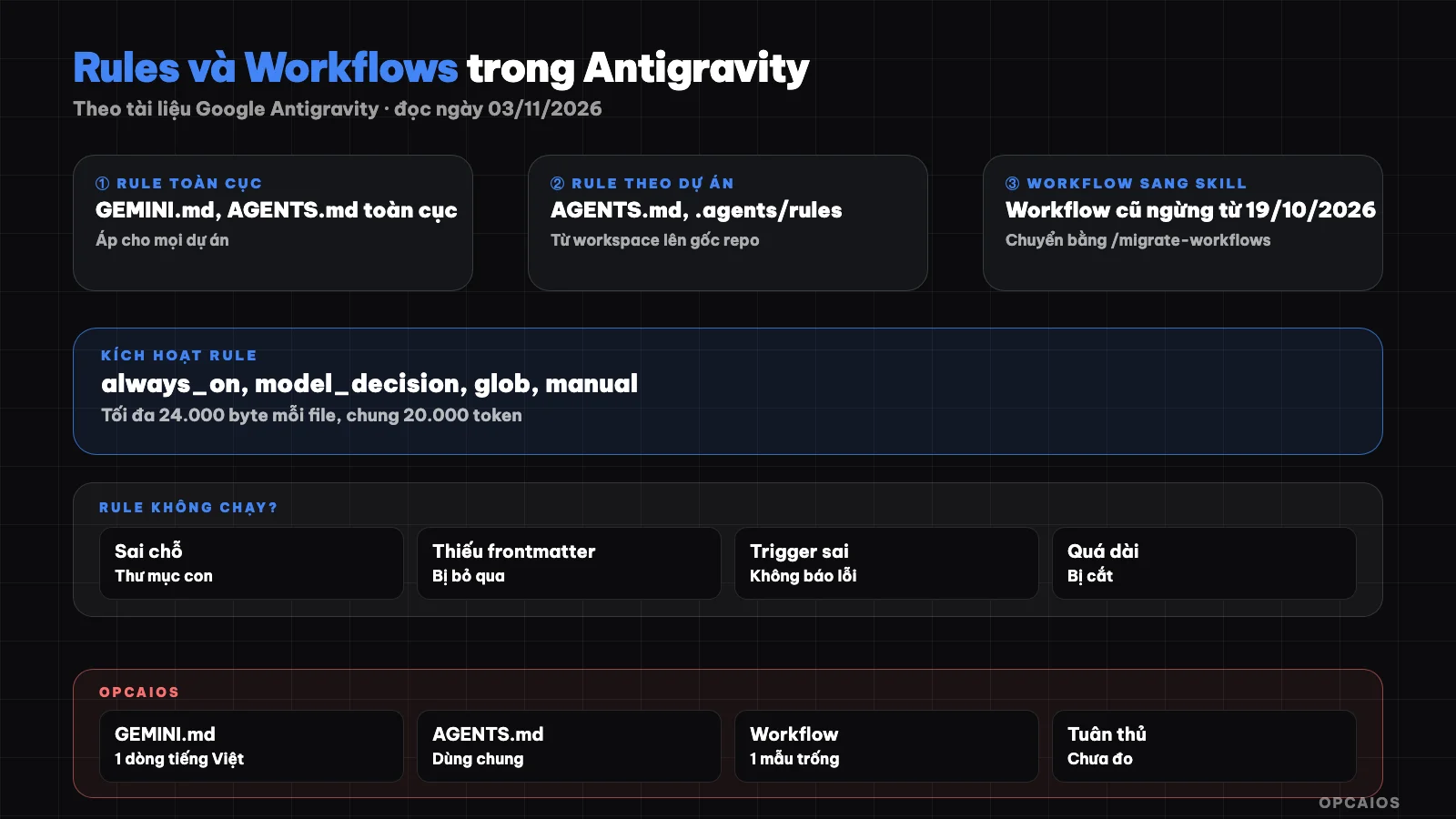
Rules are constraints that always go with the agent, skill is a multi-step process called when needed. Diagram: OPCAIOS.
How are rules in Antigravity different from skill?
Rules in Antigravity are constraints and invariants, while skill is a multi-step process, according to the /docs/rules page (read on 03/11/2026). The documentation gives an example: "always use zod to validate data" is a rule, while "how to run a database migration" is a skill. The difference lies in how they are loaded. Rules are auto-discovered by Antigravity and brought into context by activation mode. Skill only brings the name and description into context; the agent reads the full guide when the work being done matches the description. Rules are also cumulative: Antigravity merges all rules it finds, does not let one file override another. A practical way to divide for someone working alone:
- Things that must be right in every task (response language, forbidden directories to edit, naming conventions): write as a rule.
- Things needed only for a specific task (deploy, write a post, backup): write as a skill.
The skill concept in general is covered in What is skill and how to use it.
Where do I put GEMINI.md and AGENTS.md in the project?
GEMINI.md and AGENTS.md are two rule file names that Antigravity reads as plain Markdown, no frontmatter needed and always on. According to /docs/rules, in the workspace directory and each parent directory up to the repo root, Antigravity loads rules from three places:
AGENTS.mdorGEMINI.mdright in that directory..agents/AGENTS.mdor.agents/GEMINI.md.- Files in
.agents/rules/*.md(still accepts old.agent/rules/directory).
Antigravity does not read rules in subdirectories below the workspace, even when the agent reads or edits a file there. Since AGENTS.md is a convention shared between multiple agents, one file can serve both Antigravity and other tools; see What is AGENTS.md and What is CLAUDE.md to compare with Claude Code.
How are global rules different from project rules?
Global rules apply to every project on the machine, while project rules apply only within one workspace and should be committed to the code repository for the whole team to use. According to /docs/rules (read on 03/11/2026):
| Type | Location per documentation | Frontmatter |
|---|---|---|
| Global, single file | ~/.gemini/AGENTS.md, ~/.gemini/GEMINI.md, ~/.gemini/config/AGENTS.md, ~/.gemini/config/GEMINI.md |
Not needed, always on |
| Global, module form | ~/.gemini/config/rules/*.md |
Required |
| Per project | AGENTS.md, GEMINI.md, .agents/rules/*.md from workspace up to repo root |
Required for files in rules/ |
There is a small difference between surfaces: the global list in the Antigravity IDE documentation only records ~/.gemini/AGENTS.md, ~/.gemini/GEMINI.md and ~/.gemini/config/rules/*.md. In the app and IDE, create rules through the Customizations panel, Rules tab, + Global or + Workspace button. Keep global rules really short.
Four Trigger Modes: How Do They Work?
The trigger mode is the trigger key in the YAML frontmatter, which determines when a file in rules/ is loaded into context. According to /docs/rules, there are four values:
always_on: load the entire content into the system prompt every turn. If you don't need frontmatter, put it directly in AGENTS.md.model_decision: load only the path and description; the agent reads the full text when the description matches. Requires adescription.glob: automatically activate when the agent works with files matching the pattern inglobs, for example"*.ts, *.tsx".manual: never activate automatically, only added when you @-mention the rule name. Antigravity CLI does not support rule mentions.
A gotcha worth remembering: files in .agents/rules/ missing frontmatter, or with the trigger spelled wrong like alwaysOn or modelDecision, will be ignored without error. Here's an example of a rule following a file pattern (hypothetical, for illustration):
---
trigger: glob
globs: "*.sql"
description: "Rules for writing database migrations."
---
# Migration
1. Do not delete or rename columns in a single deploy.
2. Each migration must have a way to roll back.
Antigravity only scans .md files located directly in rules/; files in subdirectories are ignored unless declared in .agents/rules.json.
How Does Antigravity Handle Very Long Rules?
Antigravity sets two limits so rules don't consume the entire context window, according to /docs/rules read on 03/11/2026. First, each rule file is at most 24,000 bytes after any included files are inserted; anything over is trimmed. Second, all global rules and always_on rules share a budget of 20,000 tokens, separate from the budget for skills and MCPs. When the total exceeds 20,000 tokens, Antigravity automatically downgrades the largest files from full text to a single pointer line with path and description, so the agent can read them when needed. This is why the description of a rule matters even for always-on rules: it's what remains when the rule is downgraded. Rules also support two reference syntaxes. The @[label](path) syntax inserts the full content of the target file into the rule. The @filename syntax replaces it with an absolute path in the workspace so the agent knows exactly which file. It's best to split long rules into multiple model_decision files.
What Is a Workflow in Antigravity and Why Switch to Skills?
A workflow in Antigravity is a Markdown file containing a title, description, and sequence of steps, called with the /workflow-name command, according to the /docs/ide/workflows page (read on 03/11/2026). A workflow can call another workflow, and each file is at most 12,000 characters. However, both the workflows page and the /docs/migration/workflows-to-skills page state: workflows are now deprecated as of 19/10/2026, Google will have a new workflow system and migration guidance coming later. After that date, the old workflows directory will no longer be indexed or callable with the slash command. We have not verified this behavior ourselves on a machine.
| Criterion | Old Workflow | Skill |
|---|---|---|
| Standard | Antigravity-specific format | Open Agent Skills standard |
| Structure | One .md file |
Directory with SKILL.md and supporting files |
| Project location | .agents/workflows/<name>.md |
.agents/skills/<name>/SKILL.md |
| Global location | ~/.gemini/config/workflows/<name>.md |
~/.gemini/config/skills/<name>/SKILL.md |
| Load into context | Entire file | Name and description first, content on demand |
| Call with "/" | Yes | Yes, /<skill-name> |
The /migrate-workflows command in the Antigravity app scans both workflow directories, creates corresponding skills, renames the original files to .bak, and activates the new skills. If a workflow and skill have the same name, the skill takes priority.
How does Antigravity search for rules and skills in order?
Antigravity searches for customizations in two scopes: workspace (the .agents/ directory along with AGENTS.md, GEMINI.md) and personal (~/.gemini/config/ along with ~/.gemini/AGENTS.md, ~/.gemini/GEMINI.md), according to /docs/customization-discovery (read on 03/11/2026). The main rules are:
- Check the workspace directory and each parent directory, stopping at the repo root (the directory containing
.git); outside a repo, only the workspace is checked. - Do not search into subdirectories below the workspace.
- Scan each customization directory only one level deep: skills must be directly in
skills/, rules directly inrules/; to go deeper, declare them in a manifest file likeskills.json,rules.json. - Duplicate skill names: user directory in the repo (if repo is configured) beats workspace, workspace beats
~/.gemini/config/, and finally built-in skills. - Rules do not override each other: all found rules are loaded.
Antigravity rereads rules and skills before each turn, so new files take effect in the next message. In the CLI, run /skills reload to update the command list. The skills and MCP sections go deeper in MCP and skills in Antigravity.
OPCAIOS experience
Checked on 03/11/2026 on my main Mac (Antigravity application 2.28.x, IDE 2.5.x, CLI agy 1.4.12):
- The user-level GEMINI.md file contains only one line: always reply in Vietnamese.
- Common procedures live in AGENTS.md, placed in my home directory and in my Obsidian vault: the order is read documents at the start of a session, write logs at the end of a session, sync via one shared status file.
- There is exactly one global workflow file but it is an empty template, undocumented, and not actually in use. So the 19/10/2026 milestone does not affect us.
What I learned comparing the documentation: AGENTS.md in my home directory is not in the list of global rules, so it is only loaded if that directory is on the path from workspace up to the repo root. We have not yet verified whether this file is loaded in every project.
Frequently Asked Questions
Should I use GEMINI.md or AGENTS.md in Antigravity?
According to the /docs/rules documentation, Antigravity reads both the same way: plain Markdown, no frontmatter, always on, and content is cumulative. If you only use Antigravity, either name works. If you use multiple agents like Claude Code, Codex, Cursor, AGENTS.md is more convenient because it's a shared convention that many tools understand, so you only maintain one set of rules. Don't copy the same content into both files, because cumulative rules will cost double the tokens.
Why doesn't my rule have any effect?
Check in the order in /docs/customization-discovery. First, is the file in the right place: workspace or parent folder up to the repo root, not a subdirectory. Second, is the file directly in rules/, because subdirectories are skipped. Third, does the file in rules/ have a frontmatter with a valid trigger written in lowercase with underscores, like always_on. Fourth, isn't the rule downgraded to a pointer because it exceeded the 20,000 token budget. Finally, remember that the model can still miss a rule.
Does my old workflow still run?
According to documentation read on 03/11/2026, old-style workflows stopped working from 19/10/2026; after this date the workflow directory is no longer indexed or called by slash command. Google says a new workflow system and migration guide will come later. The current workaround is to run /migrate-workflows in the Antigravity app, or manually create a skill folder then move the content into SKILL.md with name and description frontmatter. The original file is kept with a .bak extension.
Can I call skills with "/" like workflows?
Yes. According to the workflow-to-skill migration page, every skill in .agents/skills/<name>/ or ~/.gemini/config/skills/<name>/ can be called with /<name>, just like old workflows. The difference is that agents can also pick skills by matching the description, so the description must be clear about what the skill does and when to use it. In the CLI, to add a skill while running, type /skills reload or start a new conversation. Compare the extension mechanisms in slash command, skill, plugin or MCP.
Can someone who doesn't code write rules themselves?
Yes, because a rule is just a Markdown file written in plain language. Start with a short AGENTS.md: the response language, folders you can't edit, tasks to do before deleting or deploying, how to report when done. After a few sessions, use the /learn command so Antigravity suggests rules from the times you edited it, then review each suggestion. To learn how to teach AI agents to follow your workflow, see the AI app training course from OPCAIOS.
Source: Google Antigravity documentation at antigravity.google: /docs/rules, /docs/ide/workflows, /docs/migration/workflows-to-skills, /docs/skills, /docs/slash-commands, /docs/customization-discovery (read 03/11/2026); have not self-verified that old workflows stopped running after 19/10/2026, have not verified that AGENTS.md in the user's root directory is loaded in every project, have not measured rule compliance. Experience is from OPCAIOS.
Translated from Vietnamese with AI. Read the original.
Want to apply this in your business?
Book a free 30-minute call (Vietnam time, in English or Vietnamese).