



What is Vercel? Vercel is a cloud platform to build, deploy, and operate websites and web applications: you connect your Git repository, and each time you push code Vercel automatically builds and deploys it, creating a unique address for each deployment, while server-side code (Vercel Functions) and global content distribution network are handled by the platform. Vercel is also the company that creates and maintains the Next.js framework. According to the official pricing page (checked 23/10/2026), the free Hobby plan is $0 per month, the Pro plan is $20 per month, the Enterprise plan is by agreement; only the Hobby plan is restricted to personal, non-commercial purposes. This post explains what Vercel is, how to deploy, the plans and pricing, important limits, security and environment variables, comparing it to self-hosting on a VPS, and OPCAIOS's experience in choosing where to run Next.js.
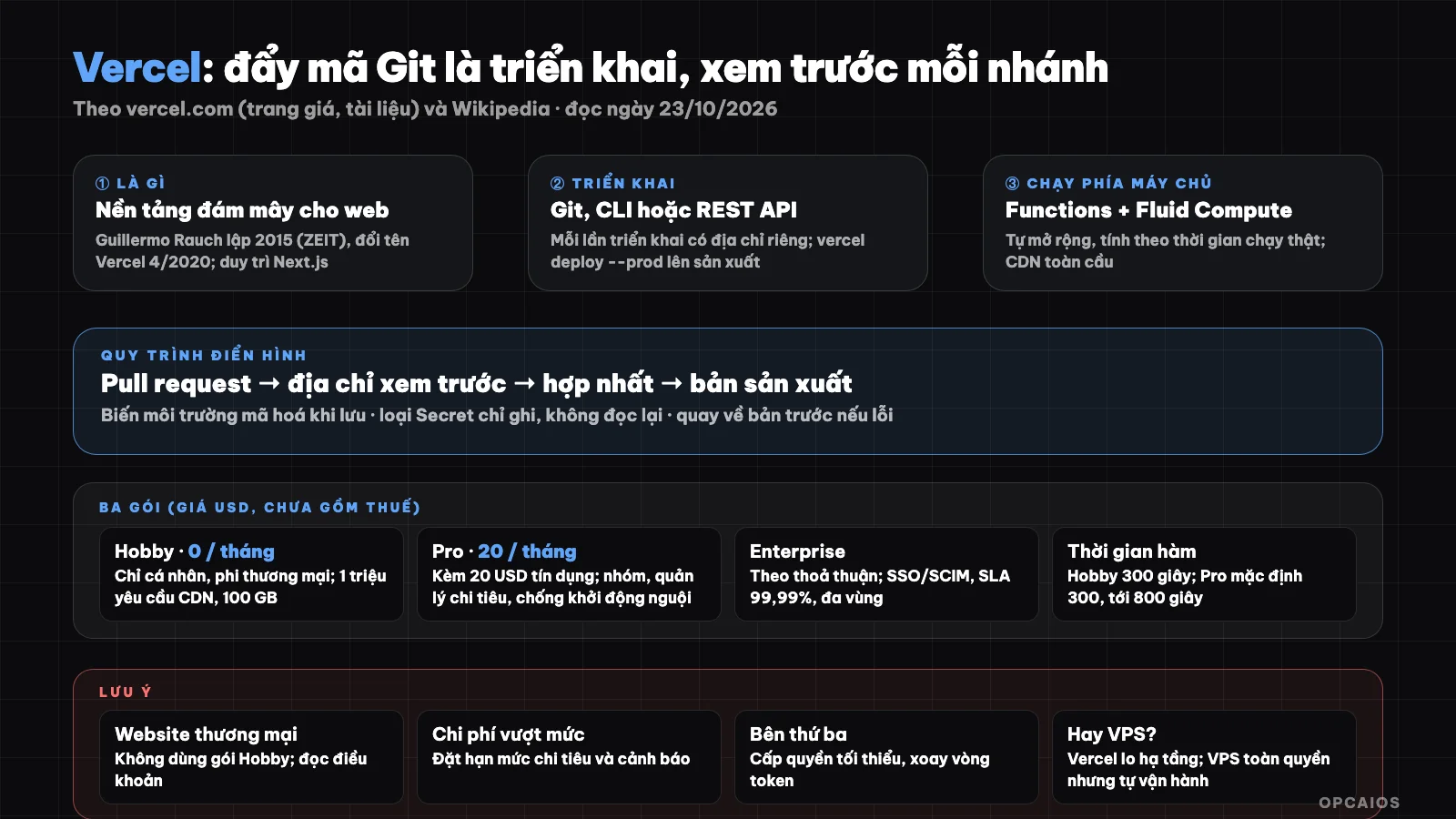
Push code to Git and Vercel builds and deploys it; preview before pushing to production; Hobby plan is for personal projects only. Diagram: OPCAIOS.
What is Vercel and who created it?
Vercel is an American cloud company specializing in providing a platform to deploy websites and web applications, and is also the unit that created the Next.js framework. According to Wikipedia, Guillermo Rauch founded the company in 2015 under the name ZEIT and renamed it to Vercel in April 2020. Rauch previously created the Socket.IO real-time communication library and the open-source Next.js framework, which Vercel optimizes for its platform. Currently Vercel has three notable products:
- A deployment platform from Git, where each change gets its own preview address.
- v0, an AI tool that creates web applications from commands.
- AI SDK, a toolset for JavaScript and TypeScript to build conversational streaming interfaces.
In terms of scale, Wikipedia records that in September 2025 Vercel raised $300 million in a Series F round at a $9.3 billion valuation, and according to W3Techs, 1.9% of websites use Vercel as their hosting provider. Hypothetical example: a small team writing an application using Next.js could choose Vercel because it's the same company making both the framework and the platform.
How does deployment on Vercel work?
Deployment on Vercel is the result of a successful build of your project, and according to official documentation, each time you deploy Vercel creates a unique address for you to review. There are three ways to create a preview and production deployment: from Git, from the Vercel CLI command-line tool, or via REST API. With the command line, vercel deploy creates a preview and vercel deploy --prod pushes to production. First check the preview address (check the logs, test the routes), then push to production. The typical process via Git consists of four steps:
- Connect your Git repository (see What is GitHub?) with a Vercel project.
- Each branch or pull request generates a preview address for review.
- When you merge into the main branch, the production deployment is deployed.
- If there's an error, you can rollback to the previous deployment.
According to Vercel (pricing page, checked 23/10/2026), automatic CI/CD is a feature of every plan, from the free $0 Hobby plan to the $20 Pro plan per month. For example, an individual developer using Vercel CLI can test a preview in 5 minutes before running the --prod command.
What are Vercel's plans and pricing?
Vercel has three plans: free Hobby, Pro, and Enterprise. According to Vercel's official pricing page (read on 23/10/2026, prices in USD, not including VAT or other taxes), the Hobby plan is $0 per month, the Pro plan is $20 per month, and Enterprise is by agreement.
| Plan | Price | Highlights |
|---|---|---|
| Hobby | $0 per month | Git import and deploy in seconds, automatic CI/CD, application firewall (WAF), global CDN, Fluid Compute, DDoS protection, traffic and performance analytics |
| Pro | $20 per month | Everything in Hobby, plus $20 usage credit, fixed-price CDN with surge protection, advanced spending management, team collaboration with free preview seats, cold start prevention, one free custom domain |
| Enterprise | By agreement | Team access control, SCIM and directory sync, managed WAF rules, multi-region compute and failover switching, 99.99% SLA, premium support |
What are the limits for Hobby and Pro plans?
According to Vercel's pricing page and plan documentation (read on 23/10/2026), the Hobby plan limits include 1 million CDN requests per month, 100 GB fast data transfer, 1 million function invocations, up to 200 projects, and functions running for a maximum of 300 seconds (5 minutes). The Pro plan offers unlimited projects, functions default to 300 seconds and configurable up to 800 seconds, plus extended durations up to 1,800 seconds in beta experimental form.
The most important thing to remember: according to Hobby plan documentation and fair use guidelines, the Hobby plan is only for personal, non-commercial purposes. If your website serves a business selling products or displaying ads, check the terms and prepare to upgrade to the Pro plan at $20 per month.
Additionally, Vercel charges for usage exceeding limits, for example the first 1 million requests are within the limit, then $0.50 USD for each subsequent million requests. So enable spending management: according to the pricing page you set a limit, receive alerts, and Vercel stops usage before exceeding your budget.
What are Vercel Functions and Fluid Compute?
Vercel Functions run server-side code for APIs, webhooks, and request processing tasks, automatically scaling with traffic. According to the pricing page, Fluid Compute only charges for actual execution time, not idle resources. The documentation recommends placing functions near your data source, since functions far from the database will suffer latency on each query; see more about databases in What is Supabase?. If you receive webhooks with functions, apply signature verification, deduplication, and return a 2xx code quickly as covered in What is a Webhook?.
How are environment variables and secrets handled?
According to the documentation, environment variables are key-value pairs set outside the source code so values change across environments, and values are encrypted when stored. Each variable is set to either Config type (value remains readable for team members with project access) or Secret type (write-only, cannot be read back after saving). When needing to rotate an API key or token, the documentation provides seamless rotation guidance. General principle: don't put secrets in the source repository; see What is GitHub?.
Security when using Vercel: lessons from the 2026 incident
According to Wikipedia, on 19/4/2026 Vercel disclosed a breach in which some internal systems were accessed without authorization; according to the company, the source was compromise of the third-party AI tool Context.ai. We only relay this record from Wikipedia and have not read the full investigation details. A general lesson for users of any platform: limit the number of third-party applications granted access to your cloud account and code repository, grant minimal permissions, rotate tokens periodically, and don't put real secrets into unnecessary AI tools; see What is MCP? on the principle of least privilege.
Vercel or self-hosting on VPS?
Choosing between Vercel and self-hosting on VPS depends on how much you want to manage yourself and how you want to pay. Vercel is a platform-as-a-service, while VPS is a virtual server you manage yourself. According to Vercel's pricing page (read on 23/10/2026), the Hobby plan is $0 and the Pro plan is $20 per month, plus overage charges; VPS is a fixed server rental fee plus operational time. Here's a general overview to help you choose:
| Criteria | Vercel | Self-hosted VPS |
|---|---|---|
| Deployment | From Git, preview each branch, almost no configuration | Build your own pipeline |
| Infrastructure | Platform handles it, CDN and functions auto-scale | You manage OS, nginx, firewall, backups |
| Cost | Fixed plan plus overage charges | Fixed server rental plus operational time |
| Best for | Next.js apps needing fast launch, small teams with minimal ops | Multiple self-hosted services, infrastructure control |
Example: a two-person team needing to launch in a few days is better suited to Vercel. See the self-hosting side in What is VPS? and What is Nginx?; if you want a distribution layer in front, see What is Cloudflare?.
OPCAIOS's experience
OPCAIOS runs Next.js on its own VPS alongside self-hosted Supabase database and some other internal services, behind nginx and Cloudflare; we haven't used Vercel for the main website and don't have an official cost comparison between the two approaches. We built our own zero-downtime deployment (build the new version then switch) so a broken build doesn't take down the site, something Vercel provides out of the box through immutable deployments and previews. In return, self-hosting gives us full configuration control, but brings security and backup responsibility. We've also upgraded Next.js from version 14 to 15, and that taught us why framework updates should have a testing step and a rollback plan.
When should you choose Vercel?
Choose it when you want to launch a Next.js or front-end app quickly with a clear Git workflow, preview URLs for each change, and minimal server management; or when you need auto-scaling server functions. Think twice if your business website is on the Hobby plan (violates terms), if overage costs are hard to predict (set a spending limit), or if you need to control infrastructure and data on your own servers.
How do you get started with Vercel?
- Put your code on Git and check that the build runs on your machine.
- Create a Vercel account and import your repo into a new project.
- Set environment variables (use Secret for sensitive keys), don't put secrets in the repo.
- Open a pull request, check the preview URL, then merge to deploy to production.
- Add your own domain and check HTTPS works.
- Turn on spending management and read the plan terms before running a business website.
Frequently Asked Questions
What is Vercel?
It's a cloud platform for deploying websites and web applications from Git, with a preview URL for each change, server-side functions, and a global distribution network; it's also the company that created Next.js.
Is Vercel free?
There's a Hobby plan at 0 USD per month but it's only for personal, non-commercial purposes. The Pro plan is 20 USD per month (including 20 USD in credits to use) for commercial projects and team work; this doesn't include tax.
Can I run an e-commerce website on the Hobby plan?
According to the Hobby plan documentation and acceptable use guidelines, this plan is limited to personal, non-commercial purposes. A website serving business should use the Pro plan; please read the current terms of service.
How is Vercel different from running your own website on a VPS?
Vercel handles infrastructure and deployment processes, charging by plan plus usage; a VPS gives you full control but you have to handle security, updates, backups, and deployment yourself.
What security considerations should I keep in mind when using Vercel?
Security when using Vercel means controlling secrets and access permissions for your cloud account, code repository, and third-party applications. First, set API keys and tokens as Secret type environment variables, which are write-only and cannot be read back after saving. Next, grant minimum permissions to every third-party application, because according to Wikipedia, the Vercel breach announced on 19/4/2026 came from the AI tool Context.ai being compromised. Then, rotate tokens regularly following Vercel's documentation on non-disruptive rotation. Finally, monitor security notifications from the provider. For example, a team using Vercel with GitHub should review the list of authorized applications every quarter. To learn how to deploy applications and automate safely, see OPCAIOS's AI application training course.
Sources: Vercel pricing page at vercel.com/pricing, documentation at vercel.com/docs (Hobby plan, Deployments, Functions, Environment variables, Limits) and Wikipedia "Vercel" (history, funding, April 2026 breach), read directly on 23/10/2026. Pricing doesn't include tax and may change; breach details taken from Wikipedia, not cross-checked with original reports. VPS comparison is a general description. Experience is from OPCAIOS.
Translated from Vietnamese with AI. Read the original.
Want to apply this in your business?
Book a free 30-minute call (Vietnam time, in English or Vietnamese).