


What is Zalo OA?
Zalo OA (Zalo Official Account) is the official business account on the Zalo platform, allowing businesses to connect and interact with Zalo users: two-way messaging, voice calls, chatbot, post content, manage group chats, and integrate with external systems via API. According to Zalo's official pricing table effective from 1/6/2026, the basic account is free, while paid packages start from 1,000,000 đồng per year (including 10% VAT); to integrate API with CRM or third-party software, you need the Growth package (2,500,000 đồng per year) or Comprehensive package (6,000,000 đồng per year). This article explains what Zalo OA is, how to create and verify it, types of messages (especially the 48-hour window and ZNS), current pricing, how to integrate API and webhook, and OPCAIOS's real experience integrating Zalo OA into CRM.
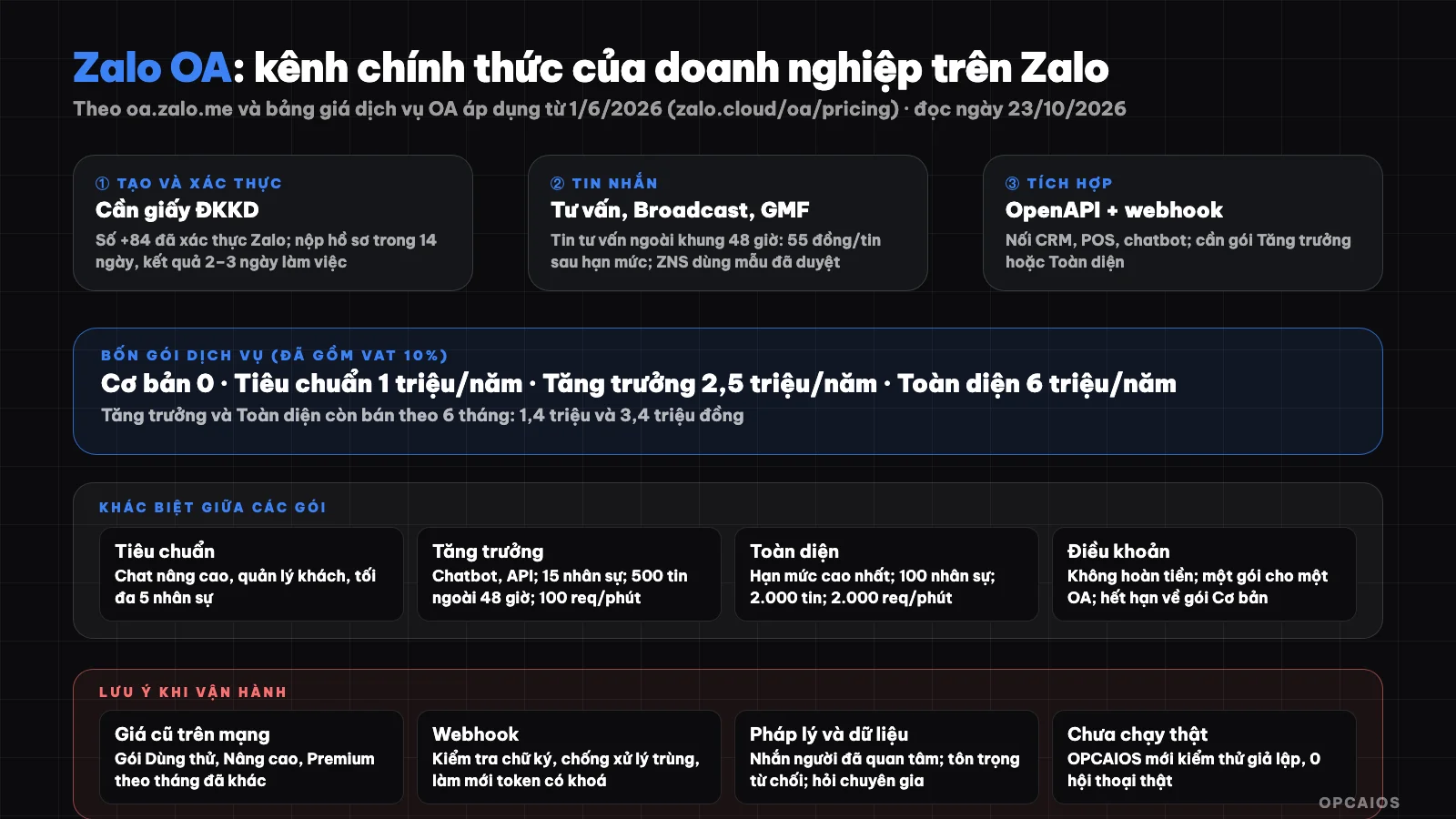
Zalo OA connects businesses with Zalo users; service packages determine limits, personnel, and API integration capabilities. Diagram: OPCAIOS.
What is Zalo OA?
Zalo OA is the official business channel on Zalo, sitting within Zalo's solution ecosystem. According to the Zalo Official Account homepage (read on 23/10/2026), the account helps businesses connect with Zalo users, has verification certification to increase credibility, costs are said to be transparent for each service, and easily connects with business systems or third parties. The features page says OA interacts with 79 million Zalo users; this is a figure announced by Zalo itself (according to Zalo), and we have not independently verified it. For example, a store with a business registration certificate can create a verified OA to send consultation messages, make phone calls, and post articles. First comes two-way messaging, followed by chatbot, and finally API integration with CRM.
What feature groups does Zalo OA have?
The main feature groups according to Zalo (read on 23/10/2026):
| Group | Content |
|---|---|
| Messaging | Two-way messaging with customers who have interacted with OA: consultation messages, GMF group chat messages, Broadcast messages, and ZBS Template Messages |
| Phone calls | Two-way branded voice or video calls |
| Menu and chatbot | Provide automatic and real-time information |
| Content | Publish articles and videos, combined with messages to reach interested people |
| Group management | Groups managed by OA for community-oriented interaction |
| OA Manager and MiniCRM | Operate OA on web and Zalo app, manage customer information, reports, assign multiple roles |
| OpenAPI and Mini App | Integrate with external systems and build small applications within Zalo |
What types of OA are there and how to create them?
Zalo OA has two types according to Zalo's guidance (read on 23/10/2026). Advertising profile is for people without a business registration certificate, only used to run ads on Zalo and cannot use messaging, Broadcast, posts, chatbot, phone calls. Verified OA is for businesses or individual business households with a business registration certificate, has a verified checkmark, and can be managed by multiple admins on multiple devices. For example, a small retail business that wants to message customers should create a verified OA rather than an advertising profile. Additionally, the OA name must follow the naming policy: business or store name, brand name that has been granted intellectual property protection certificate by the Intellectual Property Office, or other names for regulated industries, may include prefix and suffix. Profile picture minimum 240 × 240 px, cover image minimum 320 × 180 px, maximum 15 MB each image.
What are the steps to create a verified OA?
According to Zalo's official guidance, there are three steps:
- Step 1: go to oa.zalo.me, log in to personal Zalo by scanning QR code and select to create Official Account. Only Vietnam phone numbers (+84) with verified personal Zalo accounts are supported to create and manage OA.
- Step 2: fill in the business category that matches the registered business type, OA name and transparent, easy-to-understand introduction information.
- Step 3: submit verification documents. According to Zalo's policy, the administrator needs to submit within 14 days after creation and receive results within 2 to 3 business days.
What Types of Messages Are on Zalo OA and What Is the 48-Hour Window?
Messages on Zalo OA fall into two groups, according to Zalo (as of October 23, 2026): basic messages (consultation messages, GMF group chat messages, and Broadcast messages) and ZBS Template Messages. The three types of basic messages differ as follows:
- Consultation messages: used to respond when a customer contacts you, with many templates such as text, images, call-to-action buttons, and forms.
- Broadcast messages: reach people interested in your OA, and according to the feature page are completely free within the quota of your package.
- GMF group chat messages: messages within groups owned by the OA.
Additionally, the 48-hour window is the billing threshold for consultation messages: the price table has a row "Consultation Messages (outside 48h window)," 55 đồng per message (including VAT) after you exhaust the free quota of messages outside the window included in your package. For example, after a customer texts your OA, you reply within 48 hours under normal policy; if you want to reply later, you use your available quota or incur a per-message charge. Please see the detailed conditions in Zalo's document "Overview of Message Types on Zalo OA."
What Are the Zalo OA Service Packages and Current Pricing?
Zalo OA has four service packages. According to the OA service price list from Zalo Business Solutions (effective June 1, 2026, for verified OAs), prices include 10% VAT:
| Package | Price | Highlights |
|---|---|---|
| Basic | Free | Basic chat tools on the OA management page, maximum 3 staff accounts |
| Standard | 1,000,000 đồng per year (about 83,000 đồng per month) | Advanced chat interface (filtering, tagging, staff assignment, notes), customer information management, mobile chat; maximum 5 staff |
| Growth | 2,500,000 đồng per year (about 208,000 đồng per month) or 1,400,000 đồng per 6 months | Add chatbot and automation, API integration with internal or third-party systems; maximum 15 staff |
| Comprehensive | 6,000,000 đồng per year (about 500,000 đồng per month) or 3,400,000 đồng per 6 months | Full set of advanced features, highest API quota, priority support with 2-hour response time; maximum 100 staff |
What Are the Quotas and Conditions for Each Package?
According to Zalo's comparison table (effective June 1, 2026), the free monthly quota for consultation messages outside the 48-hour window is 500 in the Growth package and 2,000 in the Comprehensive package. The maximum number of chatbot scenarios is 10 and 50; API limits are 100 requests per minute and 2,000 requests per minute, not counting APIs for sending ZBS Template Messages. GMF group chats have a maintenance fee of 25,000, 55,000, 75,000, and 300,000 đồng per month for groups with a maximum of 10, 50, 100, and 1,000 members; OA messages to groups are free through December 31, 2026.
Key conditions according to the price table's Q&A section:
- To link applications via API you need the Growth or Comprehensive package. Sending ZBS Template Messages via a ZBS account using OpenAPI is also only available with these two packages (or the old Pilot, Advanced, and Premium packages).
- To purchase a package your OA must be verified, linked to a Zalo Business Solutions (ZBS) account, and have funds deposited; only administrators with permission can make purchases.
- No refunds on purchased amounts, cannot cancel immediately (only disable auto-renewal), and a package is only for one OA and non-transferable. If the package expires without renewal, the OA reverts to the Basic package.
- When quota is exhausted, incurring fees apply per interaction.
Many old articles online list different pricing (old Pilot, Advanced, Premium packages by month); those are old packages, please use the current price table on the official page.
How to integrate Zalo OA with CRM using API?
Integrating Zalo OA with CRM means using Zalo OA OpenAPI to connect your OA with internal systems or third-party services. According to Zalo's documentation (as of October 23, 2026), permission groups include messaging by UID, calling, content creation and publishing, OA information management, user information management, along with corresponding webhooks. This approach suits businesses with multiple OAs like retail chains or restaurant systems that need to sync with CDP, CRM, POS, ERP, chatbots and have a technical team. With CRM, the typical goal is: when a customer messages the OA, create or link to their profile by phone number or UID, save the conversation and notify the responsible employee. Example scenario: a lead messaging the OA at night will appear in the CRM inbox for an employee the next morning. For more on CRM in general, see What is HubSpot? and What is Salesforce?.
What technical steps are needed when integrating API?
The technical details below are what OPCAIOS applied when building integrations, based on Zalo's developer documentation that we reviewed during development. The developers.zalo.me site loads via JavaScript so we haven't cross-checked every detail recently; please review the current documentation:
- OAuth authentication using a flow with PKCE. Access tokens expire so they must be refreshed; refresh tokens can only be used once, so refreshing must be locked to prevent two processes from using the same token.
- Webhooks send events (messages from customers, OA follows, etc.) to your server; you must verify the signature of each request (the
X-ZEvent-Signatureheader) before trusting it, and prevent duplicate processing. See the framework in What is a Webhook?. - Domain verification using a verification file provided by Zalo placed at your website root.
- Choose the right message type: advisory messages within the 48-hour window; outside the window use ZNS with approved templates.
- Respect API limits of your plan and use retry with backoff; see What is an API?.
OPCAIOS's experience integrating Zalo OA into CRM
OPCAIOS built the Zalo OA integration into our internal CRM: receiving webhooks with signature verification, saving conversations to a shared inbox, linking customers by phone number, refreshing access tokens under lock, and sending messages through nurture sequences. One rule worth sharing is fallback logic: if the customer already has a conversation history with the OA, the system sends advisory text messages in free form; if it fails (usually because it's outside the 48-hour window) and a step with an approved ZNS template exists for the phone number, the system switches to sending ZNS; if the customer has never messaged the OA and has no ZNS template, mark as permanently failed rather than retrying forever. As of the writing date (October 23, 2026), the system has recorded zero real Zalo conversations, so we consider this part only tested with simulated signature webhooks, not yet operating with a real OA and without performance data to publish.
Legal and operational considerations when using Zalo OA
- Only message people who have followed or interacted with you, give them an easy way to opt out and respect opt-out requests.
- Advertising message regulations: Decree 91/2020/NĐ-CP regulates advertising messages (SMS, MMS, USSD), email and calls; we have not yet verified how it applies to in-app messages like Zalo. For email see What is email marketing?. Please consult a legal expert.
- Personal data: phone numbers and conversations are personal data; collect only what you need and restrict employee access.
- Read Zalo's policies on naming, content and account use; violations can affect your account.
- Using AI to reply to customers: someone should review responses for sensitive situations and clearly state when the customer is talking to an automated assistant; see What is vibe marketing?.
How to get started with Zalo OA?
- Prepare your business registration and a Vietnam phone number verified with personal Zalo.
- Create an OA at oa.zalo.me, name it according to policy, submit verification within 14 days.
- Start with the Basic plan, try sending advisory messages, menus and welcome messages.
- When you need multiple employees or customer management, upgrade to Standard; if you need a chatbot or API then Growth.
- Draft ZNS templates and submit for approval if you need transaction notifications.
- Monitor quotas and monthly costs in OA Manager.
Read more: Customer care via Zalo OA and Messenger with AI.
Frequently Asked Questions
What is Zalo OA?
It's the official business account on Zalo for messaging, voice calls, chatbots, posting content, group management, and integration with external systems via API.
Does creating a Zalo OA cost money?
The Basic plan is free, so creating a Zalo OA costs nothing, but upgrading to a higher plan does have a fee. According to Zalo Business Solutions' OA service pricing (effective from 1/6/2026, including 10% VAT), the OA must be verified before purchasing a plan. There are four plans:
- Basic: free, maximum 3 employee accounts.
- Standard: 1,000,000 đồng per year.
- Growth: 2,500,000 đồng per year, or 1,400,000 đồng per 6 months.
- Comprehensive: 6,000,000 đồng per year, or 3,400,000 đồng per 6 months.
For example, a business wanting to connect Zalo OA with a CRM needs at least the Growth plan, which is 2,500,000 đồng per year. Finally, advisory messages outside the 48-hour window cost 55 đồng per message after the plan's quota is exhausted. Prices may change, so please check the current pricing table on the official page.
Which plan do I need to connect Zalo OA with a CRM?
According to the pricing table, linking applications via API requires the Growth or Comprehensive plan. The Standard plan is not sufficient for API integration.
What is ZNS and how does it differ from advisory messages?
ZNS (ZBS Template Message) is an approved template message sent to a Zalo UID or phone number, used for transaction notifications and customer care, with separate pricing. Advisory messages are for responding when customers contact you, with a 48-hour window and quotas based on your plan.
What do I need to prepare before integrating the API?
A verified OA, an appropriate plan, an authorized application, verified domain name, webhook signature verification, and a secure access token refresh mechanism. To learn how to connect customer care channels with automation and AI, see OPCAIOS's AI application training course.
Source: homepage, features page, guide "Initializing Zalo Official Account" and account registration and use policies at oa.zalo.me; OA service pricing table at zalo.cloud/oa/pricing (effective from 1/6/2026); read directly on 23/10/2026. Pages developers.zalo.me and ZNS pricing page (zalo.solutions) load via JavaScript so could not be read directly; API technical information is based on OPCAIOS's programming experience. The figure of 79 million users is from Zalo's announcement and has not been verified. Prices and policies may change. This is not legal advice.
Translated from Vietnamese with AI. Read the original.
Want to apply this in your business?
Book a free 30-minute call (Vietnam time, in English or Vietnamese).