


What is Knowledge in Antigravity?
Knowledge in Antigravity is a collective term for what an agent retains after a conversation ends: conversations that can be reopened, knowledge items stored in the application data directory, and most importantly, the rule and skill files that you or the /learn command write to disk. To be plain: the current official documentation (as of 03/11/2026) has no dedicated page called "Knowledge"; the path /docs/knowledge returns 404. The documentation only mentions Knowledge as a component of an agent on the Antigravity IDE overview page, mentions "knowledge items" in the settings section, and lists "Knowledge files" in the /context table of the CLI. This post does not describe the mechanism of self-extracting knowledge because it has not been verified. The post goes through the /learn command, reopening and deleting conversations, the /context table, differences with rule files, and risks. General introduction is available in the post What is Antigravity?.
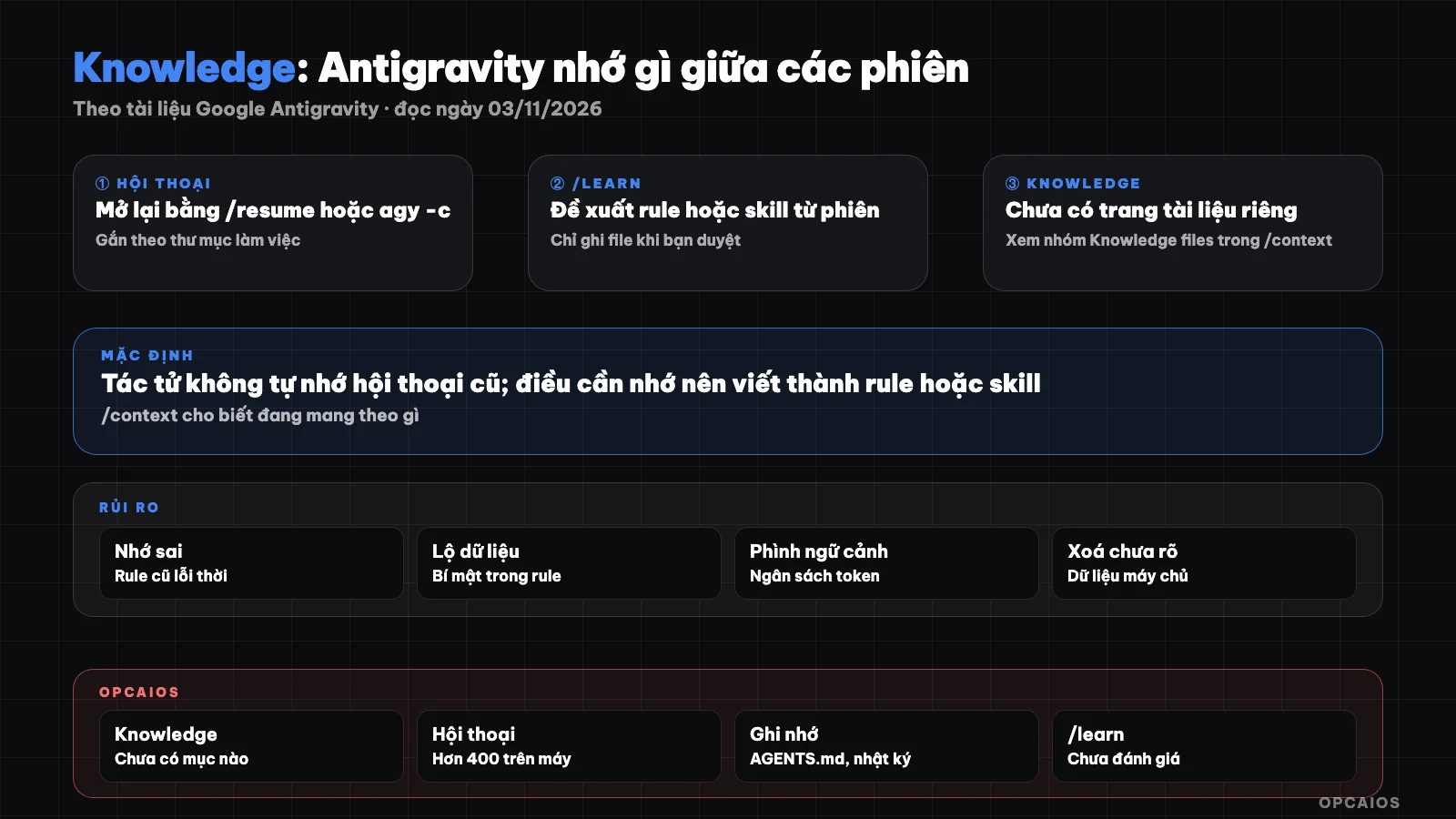
Three layers of Antigravity's memory: context within a session, saved conversations, and rule and skill files on disk. Diagram: OPCAIOS.
What does Antigravity actually remember between sessions?
Antigravity does not automatically remember conversations; the documentation for the /learn command (as of 03/11/2026) makes this clear: if you teach an agent that the test suite must run with a specific flag, that knowledge is lost when the conversation ends, unless it is written as a customization. When we say "Antigravity remembers," there are actually four things:
- Context within a session: messages, tool results, loaded files; lost when you start a new session.
- Saved conversations: can be reopened, but a new session does not automatically read old conversations.
- Knowledge items: the application data directory contains knowledge items; the documentation does not describe how to create or use them.
- Rule and skill files: AGENTS.md, GEMINI.md,
.agents/rules/,.agents/skills/; the only layer you read, edit, and completely control.
How does the /learn command work?
The /learn command is the official way to turn a lesson from a session into a rule or skill for future sessions; according to the /docs/commands/learn page (as of 03/11/2026), the command is available on Antigravity App, Antigravity CLI, and Antigravity IDE. When you type /learn with nothing after it, the agent rereads recent messages, finds times you corrected it, compares failed attempts with the final fix to extract the root cause. Then the agent categorizes: rule (constraint, prohibition) or skill (multi-step procedure), and prioritizes updating an existing file. The key safety point: the agent does not edit configuration files immediately but creates a proposed artifact named learning_proposal.md, explicitly stating the category, reason, and text to be added. You comment directly on the proposal to adjust scope, wording, or placement; only when you explicitly approve does the agent create or edit the file. If the session has nothing worth keeping, the agent says so and stops.
You can point directly to a lesson, for example hypothetically: /learn always run tests with flag X in this repository.
Where does /learn save the lesson?
/learn writes to the exact place Antigravity itself looks for customizations and states the location in the proposal:
| Type | Project scope | Global scope |
|---|---|---|
| Rule | AGENTS.md, GEMINI.md, or .agents/rules/<name>.md |
AGENTS.md, GEMINI.md, or rules/ in the user config directory |
| Skill | .agents/skills/<name>/SKILL.md |
skills/<name>/SKILL.md at user level |
Read the scope carefully in the proposal: a lesson specific to one repository but written to global scope will follow you to every project.
How do I reopen, find, and delete old conversations?
Old conversations in Antigravity CLI are tied to the working directory: according to /docs/cli/conversations (read 03/11/2026), when I run agy from a directory, I only see and reopen that directory's sessions, avoiding context mix-up. The /docs/cli/commands/resume page describes:
- Type
/resume(aliases/switch,/conversation) to open the conversation picker, with newest first; type to filter by title, the first line of the first prompt, or ID. - Press F2 to rename a conversation for easier finding.
- Press F4 to delete, with a y/n confirmation step.
- Press Tab to the "Other" tab to import a conversation started in Antigravity App into the CLI.
- From the terminal:
agy -creopens the most recent session of the current directory,agy --conversation <ID>opens exactly one session.
When I use agy -c, the CLI checks a buffer file mapping directories to the most recent conversation ID, then asks the backend if the conversation still exists; if it's been deleted, it opens a new session. The documentation doesn't say whether deleting a conversation also deletes knowledge items or server-side data; we haven't verified this.
How do I read the /context table to see what the agent is carrying?
The /context table in Antigravity CLI shows what the agent is "remembering" in the session, measured in tokens; according to the /docs/cli/commands/context page (read 03/11/2026), the table breaks down tokens by group: messages, responses, tool calls, system prompts, rules, skills, MCP tools, and free space. Below is a list of Knowledge files, Artifact files, Skill files with token counts, plus system files like GEMINI.md; this is the clearest sign in the current documentation that knowledge is still being loaded into context. When a conversation gets long, Antigravity automatically compresses old turns into checkpoint summaries, so early-session details might only remain as a summary. The documentation suggests: /btw for tangential questions, /clear (alias /new) when switching tasks, /rewind to go back to a checkpoint, turn off unused MCP via /mcp.
How is Knowledge different from rule files like AGENTS.md and GEMINI.md?
Rule files differ from conversations and knowledge items in that: rule files are text I write, stored on disk, and Antigravity automatically finds and injects them into context each session. According to the /docs/rules page (read 03/11/2026), AGENTS.md and GEMINI.md need no YAML header and are always on; each file in .agents/rules/ must have a header declaring trigger with one of four values: always_on, model_decision, glob, manual; if missing or wrong, the rule is silently skipped. Rules accumulate from project to root repository and from global config. There are two limits: each file is 24,000 bytes max, and all always-on rules share a 20,000-token budget; exceeding the budget, the largest file is downgraded to a one-line pointer so the agent can read it on demand.
| Criterion | Conversation | Knowledge | Rules, skills |
|---|---|---|---|
| Created by | Automatically | Application, mechanism not described | Me, or /learn when I browse |
| Used in new session | When reopened | Maybe, see /context |
Automatically by scope |
| Can edit | Rename, delete | No instructions yet | Edit file, push to Git |
How to write rules is in the post rules and workflows in Antigravity; similar concepts in Claude Code are in What is CLAUDE.md and What is AGENTS.md.
What are the risks of misremembering and data leaks?
The biggest risk is the agent confidently applying something outdated. Five points to watch:
- Old rules: always-on rules written long ago still get injected into every session even though the project has changed. Audit rule files regularly.
- Scope mistake:
/learnwrites a tip from one repo into global scope. Read the suggestion carefully. - Summary loses detail: after compression, the agent might forget constraints stated at session start. Important constraints should be in rule files.
- Secrets leak into files: API keys, customer data pasted into chat can leak into rule suggestions and get committed to Git.
- Data off-machine: the CLI queries the backend about conversations, meaning conversations touch the server. The FAQ page (read 03/11/2026) links to the Terms of Service and notes that data collection can be turned off in Settings; this is not legal advice.
Permissions and sandbox are in the post safe mode in Antigravity; general principles are in 5 data security rules when using AI.
OPCAIOS's Experience
At OPCAIOS, Antigravity is the coordinator agent on my main Mac, running alongside Claude Code and Codex. As of November 3, 2026, at the conceptual level:
- On my machine there are over 400 Antigravity conversations stored locally. We count directories, we don't read contents. Conversations accumulate quickly, so naming them and cleaning up old sessions is worth doing.
- The knowledge folder currently has no items saved; we haven't seen any knowledge items being created. So we don't rely on knowledge for the agent to remember.
- The memory layer we actually use is files: GEMINI.md at the user level has just one line (always reply in Vietnamese), and general rules are in AGENTS.md used by all agents: order of reading documents at session start, logging at session end, syncing via a common state file.
- There is one global workflow file but it's an empty template, not yet used in practice.
We don't have evaluation metrics for /learn and haven't measured productivity. The lesson: write what matters into short files that people read again.
Frequently Asked Questions
Does Antigravity have its own documentation page on Knowledge?
No, as of November 3, 2026: /docs/knowledge returns 404 and the documentation page list has no Knowledge entry. Knowledge appears only as the name of an agent component, like "knowledge items" in the app data folder, and as "Knowledge files" in the /context table. Detailed descriptions online mostly come from unofficial sources, so you should verify them before trusting and should not rely on them to design workflows.
Will the agent remember things I told it in a previous session?
You shouldn't count on it. The /learn command documentation clearly states the agent doesn't remember conversations, and learning will be lost when the session ends if it's not written as a rule or skill. Reopening an old session using /resume or agy -c lets you continue, but a new session won't automatically read the old one. The most durable way is to run /learn, read the suggestions, then review so the agent writes to the right scope file.
How do I delete an old conversation?
In Antigravity CLI, type /resume, select the conversation, press F4 then confirm. In Antigravity IDE, right-click the conversation in Agent Manager and select Delete Conversation, or press the trash icon in the Agent pane. The documentation doesn't clearly state whether deletion affects knowledge or server-side backups, so it's best not to paste sensitive data into conversations in the first place.
Should I use /learn or write rule files myself?
Use /learn right after you've tweaked the agent many times, when the context is still rich enough for the agent to find the root cause. Write rule files yourself when you already know clearly what constraint needs to go in, like naming conventions or forbidden folders. Either way, the result is an editable text file that can go into Git; /learn always creates suggestions for you to review first.
How do I know which rules and knowledge the agent is using?
In Antigravity CLI, type /context: the table will list the tokens of each group, which Knowledge, Artifact, Skill files are loaded, and which system rules were auto-detected. If rules take up too much space, shorten them or switch to the model_decision trigger to load only when needed. In the App and IDE, see the Rules tab in the Customizations pane. To learn how to build a rule and logging system for multiple agents working together, see OPCAIOS's AI application training course.
Source: Google Antigravity documentation at antigravity.google/docs: /commands/learn, /cli/conversations, /cli/commands/context, /cli/commands/resume, /rules, /faq, /agent, /agent-settings, /settings (read November 3, 2026); the /docs/knowledge page returned 404 the same day. Not verified: the mechanism for creating and using knowledge items, whether deleting a conversation deletes related data; descriptions of knowledge items on unofficial pages are not used as fact. The experience is OPCAIOS's.
Translated from Vietnamese with AI. Read the original.
Want to apply this in your business?
Book a free 30-minute call (Vietnam time, in English or Vietnamese).